
Build with Lovable
This is the fastest path: Lovable handles secrets and deployment for you, so there's no local setup at all.
Prerequisites
- A Lovable project
- A Supabase project connected to it (free tier is fine) — Lovable will prompt you to connect one if you haven't already
- Your Volt sandbox or production credentials: API Key, User ID, Merchant ID
Step 1 — Copy the Prompt
Copy the full prompt from the Prompt section of the main guide into Lovable's chat. It already contains the full architecture, API wiring, page behavior, and a deliverable checklist — Lovable doesn't need anything else to get started.
Step 2 — Enable Cloud
Since this app needs a backend (Edge Functions + database), Lovable will prompt you to enable Cloud for the project right after you paste the prompt. Click Allow / Enable when asked — without this, Lovable can't deploy the Edge Functions or create the bookings table, and the build will stall.
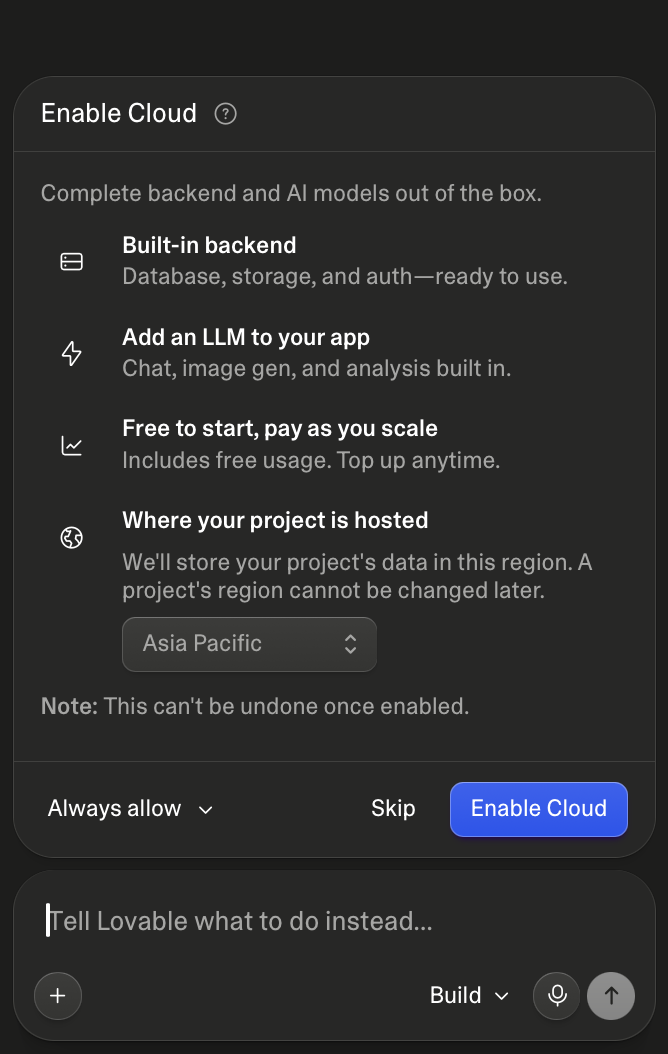
Enable cloud in Lovable
Step 3 — Add Your Volt Credentials
Lovable detects that the prompt needs secrets and will prompt you for them right in the chat. When asked, please enter the credentials in the chat:
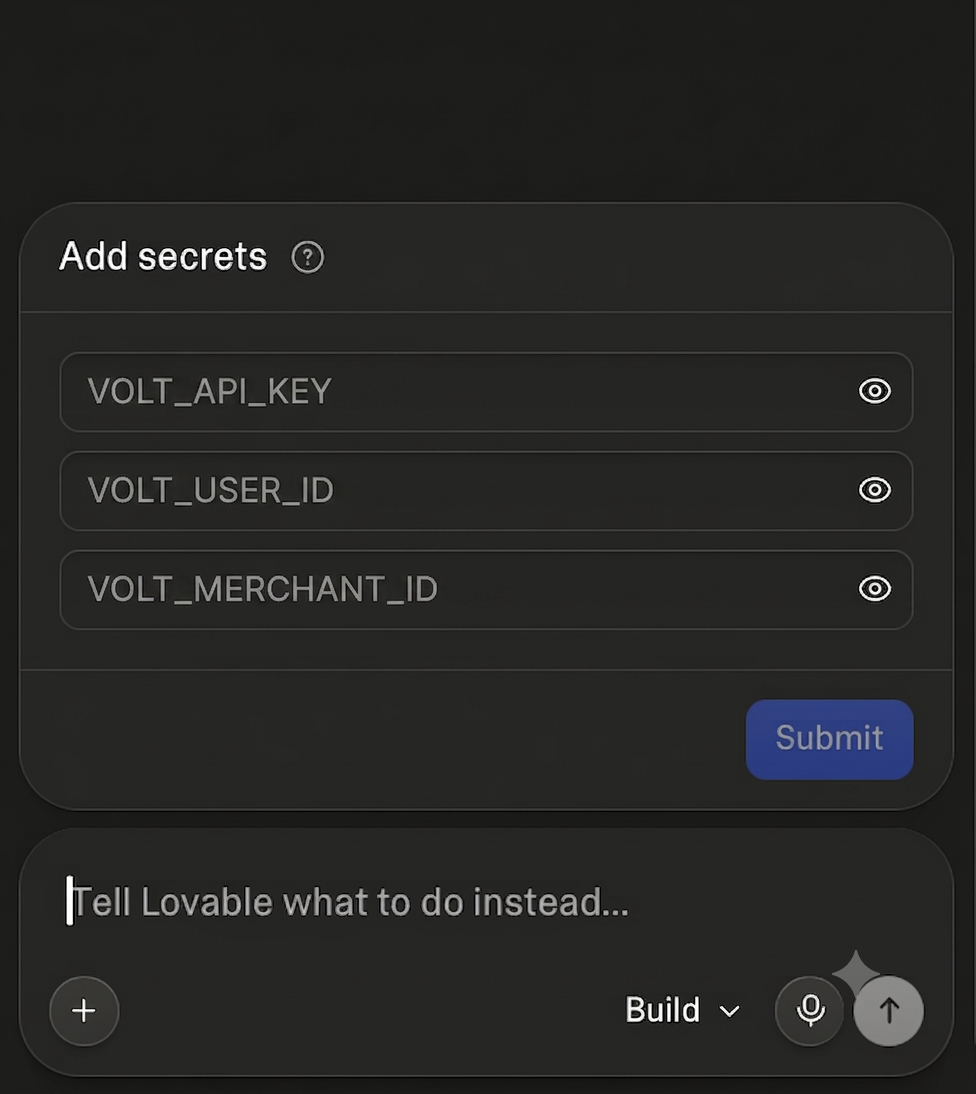
Add your VOLT Credentials in Lovable
These get stored as Lovable Secrets (synced to Supabase Edge Function secrets behind the scenes) — never as frontend env variables. Sandbox hosts present in Secrets should be swapped to production hosts only when you're ready to go live.
Step 4 — Let Lovable Build
Lovable will create the Supabase migration, deploy the Edge Functions, and scaffold the React frontend automatically. This takes a few minutes — no manual deploy steps required.
Step 5 — Customize (Optional)
The prompt ships with sensible defaults (white + blue UI, Hotels-only active flow, India-first ISD formatting). Common tweaks before pasting:
- Change VITE_APP_NAME / VITE_PRIMARY_COLOR for your brand
- Adjust the Routes table if you want different page names or extra steps
- Add a Flights or Holidays flow on top of the same Edge Function pattern (the prompt scaffolds Hotels only by default)
Step 6 — Test the Flow
Once Lovable finishes building, walk through the full journey end to end:
Search → Hotel Rooms → Book → Confirmation → My Bookings
Confirm a row lands in the Supabase bookings table for both a successful and a failed booking attempt.
Prompt ✨
Copy everything inside the block below into Lovable Chat.
# Lovable Prompt: VOLT Hotel Booking App

Build a full-stack hotel booking web app powered by the **VOLT Hotel API**. The React frontend must **never** call VOLT directly or expose credentials. All VOLT traffic goes through **Supabase Edge Functions**. Completed booking attempts are persisted in **Supabase (PostgreSQL)**.

---

## Architecture

```
┌─────────────────┐     invoke      ┌──────────────────────────┐
│  React (Lovable)│ ──────────────► │  Supabase Edge Functions │
│  + React Router │                 │  (VOLT proxy)        │
└────────┬────────┘                 └────────────┬─────────────┘
         │                                       │
         │ read/write                            │ HTTPS
         ▼                                       ▼
┌─────────────────┐                 ┌──────────────────────────┐
│  Supabase DB    │                 │  VOLT Hotel API      │
│  bookings table │                 │  (sandbox or production) │
└─────────────────┘                 └──────────────────────────┘
```

| Layer | Role |
|---|---|
| **Frontend** | UI, search state, booking forms, calls Edge Functions only |
| **Edge Functions** | Auth token cache, VOLT proxy, booking save logic |
| **Supabase DB** | Persist every booking attempt (Confirmed, Failed, Pending) |
| **VOLT** | Source of truth for availability, pricing, live booking status |

---

## Why Edge Functions Are Required

VOLT credentials (`VOLT_API_KEY`, `VOLT_USER_ID`, `VOLT_MERCHANT_ID`) and the OAuth access token **must stay server-side**. The browser cannot hold these secrets.

Edge Functions must:

1. Authenticate with VOLT (`POST /authentication/internal/service/login`)
2. Cache and refresh the access token in memory (per isolate)
3. Proxy all hotel API calls with correct headers
4. Normalize payloads before booking (strip `+` from `isdCode`, clean `specialRequests`)
5. Save booking records to Supabase after every book attempt

---

## Why Supabase for Booking Data

Replace MongoDB with a Supabase `bookings` table. **Save every book attempt** — do not skip Failed or Pending outcomes.

VOLT remains the source of truth for live status; Supabase is your app's booking history and confirmation UI cache.

---

## Supabase Secrets (Edge Function env)

Set these in Supabase project secrets — never in frontend code or Vite env.

**All API base URLs live in secrets only.** Edge Functions must read them via `Deno.env.get(...)` — do not hardcode VOLT hosts in function source or frontend.

```env
VOLT_API_KEY=
VOLT_USER_ID=
VOLT_MERCHANT_ID=
VOLT_AUTH_URL=https://trav-auth-sandbox.travclan.com
VOLT_SEARCH_API_URL=https://hotel-volt-api-sandbox.travclan.com
VOLT_HOTEL_HELPER_HOST=https://hotel-api-sandbox.travclan.com
VOLT_SOURCE=website
```

### Sandbox URLs (default) — update before go-live

The values above are **sandbox** endpoints. They are correct for development and QA only.

When you paste credentials into the Lovable chat or Supabase dashboard, **also tell the developer explicitly:**

> The VOLT API URLs in Supabase secrets are currently set to **sandbox** URLs. Before taking the app live, update these three secrets to the **production** URLs (credentials team will provide production values):
>
> | Secret | Sandbox (current default) | Production (update before go-live) |
> |---|---|---|
> | `VOLT_AUTH_URL` | `https://trav-auth-sandbox.travclan.com` | `https://trav-auth.travclan.com` |
> | `VOLT_SEARCH_API_URL` | `https://hotel-volt-api-sandbox.travclan.com` | `https://hotel-volt-api.travclan.com` |
> | `VOLT_HOTEL_HELPER_HOST` | `https://hotel-api-sandbox.travclan.com` | `https://hotel-api.travclan.com` |
>
> Keep `VOLT_API_KEY`, `VOLT_USER_ID`, and `VOLT_MERCHANT_ID` aligned with the same environment (sandbox keys + sandbox URLs, or production keys + production URLs). Redeploy Edge Functions after changing secrets.

Optional frontend branding (safe in `.env` or Lovable env). These feed `src/config/brand.ts` — see **Branding & Theme** below:

```env
VITE_APP_NAME=SNAP
VITE_PRIMARY_COLOR=#3b82f6
VITE_SECONDARY_COLOR=#1e40af
VITE_BG_COLOR=#ffffff
```

---

## Database Schema

Create a `bookings` table:

```sql
create table public.bookings (
  id uuid primary key default gen_random_uuid(),
  booking_ref_id text,
  itinerary_code text,
  status text not null default 'Pending',
  provider_confirmation_number text,
  trace_id text,
  hotel_id text,
  option_id text,
  hotel_name text,
  check_in date,
  check_out date,
  amount numeric,
  currency text default 'INR',
  room_details jsonb not null default '[]',
  guests jsonb not null default '[]',
  lead_guest jsonb,
  special_requests text,
  upstream_error text,
  upstream_saved boolean default true,
  created_at timestamptz not null default now()
);

create index bookings_booking_ref_id_idx on public.bookings (booking_ref_id);
create index bookings_created_at_idx on public.bookings (created_at desc);
create index bookings_trace_id_idx on public.bookings (trace_id);

alter table public.bookings enable row level security;

-- Allow anonymous read/write for MVP (tighten with auth later)
create policy "Allow public read bookings"
  on public.bookings for select using (true);

create policy "Allow public insert bookings"
  on public.bookings for insert with check (true);
```

**Fields to store on every book attempt:**

| Field | Source |
|---|---|
| `booking_ref_id`, `itinerary_code`, `status`, `provider_confirmation_number` | VOLT book response |
| `trace_id`, `hotel_id`, `option_id`, `room_details`, `guests`, `lead_guest` | Request payload |
| `amount`, `currency`, `hotel_name`, `check_in`, `check_out` | Request meta (UI only — not sent to VOLT) |
| `special_requests`, `created_at` | Request + server timestamp |
| `upstream_error`, `upstream_saved` | Set when VOLT HTTP fails before a normal response |

**Save policy:**

| Outcome | `status` in Supabase |
|---|---|
| VOLT returns Confirmed / Failed / Pending / etc. | Exact upstream `status` (default `Pending` if missing) |
| VOLT HTTP error (502/504) before response | `Failed` + `upstream_error`, `upstream_saved: false` |

---

## Edge Functions

Create one function per route group (or a single router function). All must return JSON and set CORS headers for the Lovable frontend origin.

### Shared: VOLT auth helper

```typescript
// Cache token in module scope (per isolate)
let cachedToken: string | null = null;
let expiresAt = 0;

async function getVoltToken(): Promise<string> \{
  if (cachedToken && Date.now() < expiresAt) return cachedToken;

  const res = await fetch(
    `${Deno.env.get("VOLT_AUTH_URL")}/authentication/internal/service/login`,
    {
      method: "POST",
      headers: {
        "Content-Type": "application/json",
        "Authorization-Type": "Bearer",
        source: Deno.env.get("VOLT_SOURCE") ?? "website",
      },
      body: JSON.stringify({
        api_key: Deno.env.get("VOLT_API_KEY"),
        user_id: Deno.env.get("VOLT_USER_ID"),
        merchant_id: Deno.env.get("VOLT_MERCHANT_ID"),
      }),
    }
  );
  if (!res.ok) throw new Error(`VOLT auth failed: ${res.status}`);
  const data = await res.json();
  cachedToken = data.AccessToken;
  expiresAt = Date.now() + (3600 - 300) * 1000; // 1h minus 5min buffer
  return cachedToken!;
\}
```

### Shared: VOLT request helper

Headers for outbound calls:

- `Authorization-Type: external-service`
- `source: website` (from env)
- `Authorization: Bearer {token}`
- `Content-Type: application/json` on POST only — **never on GET**

On 401: refresh token once and retry.

On non-success: return JSON with HTTP status matching the failure class and a structured body the frontend can parse:

```json
{
  "error": {
    "code": 502,
    "upstreamStatus": 504,
    "message": "Upstream service error"
  }
}
```

- `code` — Edge Function / normalized error code (use upstream HTTP status when available, else 502)
- `upstreamStatus` — optional; original upstream HTTP status when the hotel API returned non-2xx
- `message` — short internal label for logging only; **never show this string directly in the UI**

Do not leak raw upstream bodies, stack traces, or credentials. Always set CORS headers even on error responses so the browser can read the JSON body (avoids opaque "Edge Function returned a non-2xx status code" with no payload).

### Edge Function routes

| Function | Method | VOLT upstream | Description |
|---|---|---|---|
| `locations-search` | GET | `GET {HELPER}/api/v1/locations/search?searchString=` | Location autosuggest |
| `hotels-search` | POST | `POST {SEARCH}/api/v1/search` | Hotel search |
| `hotel-static-content` | GET | `GET {HELPER}/api/v1/hotels/{id}/static-content` | Hotel details |
| `rooms-and-rates` | POST | `POST {SEARCH}/api/v1/roomsandrates` | Rooms and rates |
| `bookings-price-check` | POST | `POST {SEARCH}/api/v1/price-check` | Price check |
| `bookings-create` | POST | `POST {SEARCH}/api/v1/book` | Create booking + **save to Supabase** |
| `bookings-get` | GET | `GET {HELPER}/api/v1/hotels/itineraries/bookings/{ref}` | Live booking details by code |
| `bookings-by-trace` | GET | `GET {HELPER}/api/v1/hotels/itineraries/bookings/status/{traceId}` | Live booking details by trace |
| `bookings-cancel` | POST | `POST {HELPER}/api/v1/hotels/itineraries/bookings/{bookingCode}/cancel` | Cancel a booking |
| `hotels-static-content` | GET | `{HELPER}/api/v1/hotels/static-content` with hotel ids (max 25) | Names and images for many hotels |
| `wallet` | GET | `GET {HELPER}/api/v1/hotels/wallet/` | Wallet balance — wrapper only, no wallet screen |
| `bookings-saved` | GET | — | List rows from `bookings` table (newest first) |
| `bookings-saved-one` | GET | — | One row by `booking_ref_id` |

Frontend calls these via:

```typescript
const { data, error } = await supabase.functions.invoke('hotels-search', {
  body: { locationId, checkIn, checkOut, nationality: 'IN', occupancies, page: 1 },
});
```

Or `fetch(`${SUPABASE_URL}/functions/v1/hotels-search`, { ... })` with the anon key.

### Booking create function — critical logic

1. Accept payload with VOLT fields + UI meta (`hotelName`, `checkIn`, `checkOut`, `totalAmount`, `currency`)
2. Strip meta before calling VOLT
3. Normalize:
   - `isdCode`: strip leading `+` (e.g. `91` not `+91`)
   - `specialRequests`: collapse whitespace/newlines; omit if empty
4. Call VOLT `POST /api/v1/book`
5. **Always insert** into `bookings` table (success or failure). Map top-level `bookingId` → `booking_ref_id` and `bookingStatus` → `status` (`Confirmed` | `Pending` | `Failed`). Also store `providerConfirmationNumber`.
6. Return VOLT response to frontend

---

## Volt response contracts

Source of truth for VOLT envelopes and keys. Do not invent `results.hotels` or nested `results[0].data[0].bookingRefId`. Keep **UI Error Rules**: never show provider names; show an HTTP status only on the rooms-rates failure. Recognize Volt codes internally and map them to that copy.

**Hosts (Supabase secrets):**

| Secret | Used for |
|---|---|
| `VOLT_SEARCH_API_URL` | `POST /api/v1/search`, `/api/v1/roomsandrates`, `/api/v1/price-check`, `/api/v1/book` |
| `VOLT_HOTEL_HELPER_HOST` | locations, static content, booking details, cancel, wallet |

**Flow:** search → optional static content → rooms and rates → price check → book → optional details / cancel.

**Success envelope:** `message`, `error` (boolean), `code`, `results`.

**Error envelope:** `httpStatusCode`, `error.code`, `error.message`, `error.errors[]`, `error.traceId`. HTTP **401** = session expired (refresh token once). Volt **1001** = search session expired → "Your session has expired. Please search again."

Recognize internally (do not print the code except on the rooms-rates panel): `1000`, `1003`, `1005`, `1010`–`1013` (sold out / price changed), `1014`–`1016` (already booked / failed / pending), `1044` (PAN), `1048` (invalid option), `1050` (invalid trace), `1051` (rooms-and-rates without a search).

### Locations — `results[]`

| Key | Description |
|---|---|
| `id` | Location identifier. `0` for hotels — use `referenceId` |
| `referenceId` | Hotel identifier when `id` is `0` |
| `name` | Location or hotel name |
| `fullName` | Name plus city, state, country |
| `type` | `City` \| `Hotel` \| `Neighborhood` |
| `city`, `state`, `country` | Geography |
| `coordinates.lat`, `coordinates.long` | Geo point |
| `relevanceScore`, `travclanScore` | Ranking |

### Search: Response Keys

Omit `traceId` on the first hotel search. Hotels are in `results.data[]` (not `results.hotels`). `hotelId` in this table is `data[].id`. Meal plan, refundability, cancellation, and price sit on `data[].availability.rate`.

| Key | Description |
|---|---|
| `traceId` | Unique ID of the search session |
| `hotelId` | Unique ID of the hotel (`data[].id`) |
| `hotelName` | Hotel name |
| `heroImage` | Main image of the hotel, meant for the search results card |
| `boardBasis` | Meal plan of the rate shown for the hotel (`availability.rate.boardBasis`) |
| `refundability` | Whether the rate can be cancelled for free |
| `cancellationPolicy` | Cancellation terms for the rate, made up of one or more rules |
| `finalRate` | Final price of the hotel's lead rate |

Also: `traceIdDetails.remainingTime`, `currentPage`, `perPage`, `nextPage`, `previousPage`, `totalCount`, `totalPages`. `filterBy.tags` is only valid after a previous search returned those ids. If `hotelName` is empty, fill from `hotels-static-content`.

### Rooms and rates — key identifier

`results.options` is a map. The **map key is `optionId`**. Volt docs also call this `recommendationId` — it is **required for price check and booking**. Each option is one bookable set of rooms.

| Component | Description |
|---|---|
| `options` | Map of rate options. Key = `recommendationId` / `optionId` |
| `rooms` | Room name, description, facilities, beds, size — join via `rate.occupancies[].roomId` |
| `standardizedRooms` | Normalized room + images — join via `rate.occupancies[].stdRoomId` |
| `rate` | Price, meal plan, refundability, occupancy, document flags |

| Key | Description |
|---|---|
| `recommendationId` / `optionId` | Unique id of the chosen option — send as `optionId` on price check and book |
| `rate.finalRate` | Final payable amount |
| `rate.currency` | Currency code |
| `rate.refundability` | Whether the rate can be cancelled for free |
| `rate.occupancies[].roomId` | Join `results.rooms[roomId].name` |
| `rate.occupancies[].stdRoomId` | Join `results.standardizedRooms[stdRoomId].images` |
| `rate.isPANMandatory` | PAN required on book |
| `rate.isPassportMandatory` | Passport required on book |
| `rate.allGuestsInfoRequired` | Full guest details required |
| `rate.needsPriceCheck` | Revalidate price before book |

#### boardBasis (on every rate)

`results.options[optionId].rate.boardBasis`. Filter and badges must use `type`, never `description`.

| Field | Type | Description |
|---|---|---|
| `boardBasis` | object | Meal-plan info on a rate |
| `boardBasis.description` | string | Raw text (discounts, pax notes). Display only |
| `boardBasis.type` | string | Standardized bucket — use for filters and badges |

| `boardBasis.type` | Meaning |
|---|---|
| `RoomOnly` | No meals included |
| `BedAndBreakfast` | Room + breakfast |
| `HalfBoard` | Breakfast + one more meal |
| `FullBoard` | Breakfast + lunch + dinner |
| `AllInclusive` | All meals (typically drinks/snacks) |

Closed list — every rate uses one of these five values.

### Price check — `results.priceChangeData`

| Key | Description |
|---|---|
| `isPriceChanged` | Whether the price changed since rooms and rates |
| `oldPrice` | Price shown before this check |
| `newPrice` | Current price. If changed, get consent. Do not book `oldPrice` |

### Book — success keys (top-level)

| Key | Description |
|---|---|
| `token` | Token for the booking request |
| `bookingStatus` | `Confirmed` \| `Pending` \| `Failed` |
| `bookingId` | Unique booking id — persist as `booking_ref_id` |
| `providerConfirmationNumber` | Provider confirmation |
| `hotelConfirmationNumber` | Hotel confirmation |
| `roomConfirmation[]` | Per-room `roomId`, `rateId`, status |

Treat `Failed` as an error even on HTTP 200.

### Cancel

| Key | Description |
|---|---|
| `results[].bookingStatus` | Success only when `Cancelled` |
| `results[].serviceRequestCode` | Cancellation request id |
| `results[].bookingInfo.hotelName` | Hotel name |
| `results[].bookingInfo.checkIn` | Check-in date |
| `results[].bookingInfo.checkOut` | Check-out date |

### Static content (one hotel) — `results[0].data[0]`

| Key | Description |
|---|---|
| `name` | Hotel name |
| `starRating` | Star rating |
| `heroImage` | Main image |
| `descriptions[].text` | Description blocks |
| `contact.address` | Address |
| `images` | Gallery |
| `facilities`, `policies` | Amenities and policies |
| `checkinInfo`, `checkoutInfo` | Check-in / check-out |
| `geoCode` | Coordinates |

### Wallet

| Key | Description |
|---|---|
| `balance` | Current wallet balance |
| `currency` | Currency code |
| `code` | Wallet code |
| `member_code` | Member code |
| `organization_code` | Organization code |

Wrapper only — no wallet screen.

---

## Frontend Tech Stack

- React 18 + TypeScript
- React Router v6
- Zustand for client state
- Tailwind CSS
- Supabase JS client for Edge Function invocations and saved bookings
- Native fetch or `supabase.functions.invoke`

**Do not** use a separate FastAPI backend, Docker, or MongoDB.

---

## Routes

| Route | Page |
|---|---|
| `/` | Landing — hero + search pill |
| `/hotels/search` | Search results grid |
| `/hotel/:id/rooms` | Room selection |
| `/book` | Traveller / contact form |
| `/book/confirmation` | Booking confirmation |
| `/bookings` | My bookings (from Supabase `bookings` table) |

---

## URL Query Params (search page)

Sync search state on `/hotels/search`:

| Param | Example | Required |
|---|---|---|
| `locationId` | `loc_abc123` | yes (or `hotelId` for hotel-type picks) |
| `checkIn` | `2026-06-15` | yes |
| `checkOut` | `2026-06-18` | yes |
| `adults` | `2` | yes |
| `children` | `0` | no |
| `rooms` | `1` | yes |
| `page` | `1` | no |

Trigger hotel search when all required params are present.

---

## Visual Design

- Layout driven by **brand config** (`src/config/brand.ts`) — background, primary, and secondary colors
- Bold branding from product name in brand config (default **SNAP**)
- **Header nav tabs** (required on every page): center-aligned **Hotels** · **Flight** · **Packages** — see Navbar spec below
- Rounded pill search bar
- Hotel image grid for search results
- Room page with sticky pricing sidebar
- Booking form with traveller-details stepper
- Premium product feel — not a default admin dashboard

**Colors (defaults — override via brand config):**

| Token | Env var | Default | Use |
|---|---|---|---|
| Background | `VITE_BG_COLOR` | `#ffffff` | Page background, cards on tinted sections |
| Primary | `VITE_PRIMARY_COLOR` | `#3b82f6` | CTAs, search button, links, active tabs |
| Secondary | `VITE_SECONDARY_COLOR` | `#1e40af` | Hover states, accents, badges, hero emphasis |
| Text | — | `#111827` | Body copy (fixed unless user requests change) |
| Borders | — | `#e5e7eb` / `#dbe2ef` | Dividers and inputs |

Primary CTAs: primary color background + white text — never white-on-white.

**Hero tagline:** derive from product name, e.g. `BOOK HOTELS` / `IN A {BRAND}` (adapt to `VITE_APP_NAME`).

---

## Branding & Theme (single change point)

**All product name and color theming must flow from one file** so the owner can rebrand without hunting through components.

Create `src/config/brand.ts`:

```typescript
export const brand = {
  name: import.meta.env.VITE_APP_NAME ?? "SNAP",
  colors: {
    primary: import.meta.env.VITE_PRIMARY_COLOR ?? "#3b82f6",
    secondary: import.meta.env.VITE_SECONDARY_COLOR ?? "#1e40af",
    background: import.meta.env.VITE_BG_COLOR ?? "#ffffff",
    text: "#111827",
    border: "#e5e7eb",
  },
  tagline: {
    line1: "BOOK HOTELS",
    line2: `IN A ${(import.meta.env.VITE_APP_NAME ?? "SNAP").toUpperCase()}`,
  },
} as const;
```

**Rules:**

1. **Never hardcode** the product name or theme colors in individual components — import from `@/config/brand` (or `brand.colors.primary`, etc.).
2. Wire Tailwind to brand tokens in `tailwind.config.ts` (extend `theme.colors.brand.primary`, `brand.secondary`, `brand.background`) and set `body` background in `index.css` from `brand.colors.background`.
3. Navbar logo text, hero headline, document `<title>`, and favicon label all use `brand.name`.
4. Search CTA, primary buttons, active tab underline, and link accents use `brand.colors.primary`; hovers and secondary highlights use `brand.colors.secondary`.

### Where to change branding later

| What to change | Where |
|---|---|
| Product name | `.env` → `VITE_APP_NAME` **or** default in `src/config/brand.ts` |
| Primary color | `.env` → `VITE_PRIMARY_COLOR` **or** default in `src/config/brand.ts` |
| Secondary color | `.env` → `VITE_SECONDARY_COLOR` **or** default in `src/config/brand.ts` |
| Background color | `.env` → `VITE_BG_COLOR` **or** default in `src/config/brand.ts` |
| Hero tagline lines | `src/config/brand.ts` → `tagline.line1` / `tagline.line2` |

**Recommended for non-developers:** edit the four `VITE_*` values in Lovable **Project Settings → Environment Variables**, then refresh preview. No component files need to change.

---

## UI Error Rules (all pages)

**Never expose provider or infrastructure names in the UI.** Do not show "VOLT", "upstream", "Edge Function", or similar anywhere users can see — including error text, loading copy, empty states, or dev fallbacks.

| Context | User-facing message | Show HTTP status? |
|---|---|---|
| Hotel search failure | "We couldn't load hotels right now. Please try again." | No |
| Location autosuggest failure | "Location search is unavailable. Please try again." | No |
| Rooms — static content failure | "Unable to load hotel details. Please try again." | No |
| Rooms — **rates** failure | **"Room rates API failed"** | **Yes** — one line, e.g. `Error code: 502` |
| Price check failure | "Unable to verify the latest price. Please try again." | No |
| Booking failure | "Booking could not be completed. Please try again or start a new search." | No |
| Session / trace expired | "Your session has expired. Please search again." | No |

**Parsing rule:** Never display `error.message` from `supabase.functions.invoke` verbatim. Always map through the table above (or the rooms-specific row for rates).

**Status code rule:** Only the **room rates** error state may show an HTTP status code. Every other error is generic with **no** status code visible to the user.

---

## Shared UI Components

### Navbar

- Brand logo / name on the left — use `brand.name` from `src/config/brand.ts`
- **Product header tabs** (center of navbar, visible on **all pages** — Home, search, rooms, book, confirmation, bookings):

| Tab | Label | MVP behavior |
|---|---|---|
| Active product | **Hotels** | Clickable — navigates within hotel flow (`/` or `/hotels/search` as appropriate). Visually active (primary color underline or bold). |
| Placeholder | **Flight** | **Not clickable** — render as plain text / disabled tab. No `<Link>`, no `onClick`, no route. |
| Placeholder | **Packages** | **Not clickable** — same as Flight. |

**Header tab rules (strict):**

1. All three labels — **Hotels**, **Flight**, **Packages** — must always appear in the header UI.
2. Only **Hotels** is interactive in this build. **Flight** and **Packages** are visual placeholders until dedicated flows exist.
3. Do **not** make Flight or Packages clickable, hover-linked, or routable unless you have actually implemented flight search/booking or packages search/booking pages and Edge Functions. No `href="#"`, no toast "coming soon" on click — simply non-interactive.
4. Style disabled tabs: muted text (`text-gray-400` or similar), `cursor-default`, no pointer hover effect. Optional small "Soon" badge is OK; do not use modals or alerts on click.
5. Use `aria-current="page"` on Hotels when in hotel flow; `aria-disabled="true"` on Flight and Packages.
6. Extract into `HeaderProductTabs.tsx` (or equivalent) so clickability can be toggled in one place when Flight/Packages are built later.

- Circular menu button → support drawer (placeholder contact info)

### Search Bar

Reusable pill on landing and search pages:

- Location autosuggest → Edge Function `locations-search`
- Dual-month date-range picker
- Guest and room summary
- Visible blue circular search CTA using primary color

**Search flow:**

1. Validate dates and location
2. Clear stale results
3. Set loading
4. Navigate immediately to `/hotels/search` (do not await API in search bar)
5. Show spinner + "Searching hotels…" below pill while loading
6. Fetch hotels on results page (`useEffect`)

**Date validation:** block search if `checkOut <= checkIn`.

**Location autosuggest (VOLT response):**

`results` is an **array**. Each item:

| Field | Use |
|---|---|
| `id` | Location ID; for hotels may be `0` — then use `referenceId` |
| `name` | Primary label |
| `fullName` | Subtitle |
| `type` | Badge: `City`, `Hotel`, `Neighborhood` |
| `referenceId` | Hotel ID when `type` is `Hotel` and `id` is 0 |

**Search payload by type:**

- `City` / `Neighborhood` → `locationId` (string of `id`)
- `Hotel` → `hotelId` (string of `referenceId` or `id`), omit `locationId`

User **must pick from dropdown** — typing alone does not set a valid ID.

After selection, show `name` in input (not `fullName`). Do not re-call location search until user edits the field again.

Sort autosuggest: prefer exact name match; for "Dubai" prefer UAE cities over similarly named places.

**Hotel search response:** hotels are in `results.data` (not `results.hotels`). Card fields: `id`, `hotelName`, `heroImage`, `availability.rate.finalRate`, `availability.rate.boardBasis.type`, `availability.rate.refundability`. When `hotelName` is empty, call `hotels-static-content`. Store `results.traceId`.

---

## Page Behavior

### Home

Navbar + search pill, hero typography, accent color from env.

### Hotel Search

- Compact search pill below navbar
- Loading: spinner below pill + skeleton cards in grid
- Disable search button while loading
- Clear stale results before navigate
- Fetch in `useEffect` with in-flight dedupe
- Pagination when `nextPage` is returned
- Click card → `/hotel/:id/rooms?traceId=...&checkIn=...&checkOut=...&adults=...&children=...&rooms=...`
- User-facing errors must follow the **UI Error Rules** section (generic copy, no provider names)

### Hotel Rooms

On load, parallel-fetch:

1. `hotel-static-content` — hero, name, star rating, address, description
2. `rooms-and-rates` — `{ traceId, hotelId }`

**Static content:** `results[0].data[0]` — `name`, `starRating`, `heroImage`, `descriptions[].text`, `contact.address`, `images[]`

**Rooms/rates:** `results.options` dict keyed by option UUID (`optionId` / docs `recommendationId`). `rate.boardBasis.type` is `RoomOnly` | `BedAndBreakfast` | `HalfBoard` | `FullBoard` | `AllInclusive` (badge uses type; `description` is small print). Join room name from `results.rooms[roomId].name` and images from `results.standardizedRooms[stdRoomId].images`. Collect PAN / passport only when `isPANMandatory` / `isPassportMandatory`.

Auto-select first room option. Sticky pricing sidebar. **Continue to book** always visible.

#### Rooms page — error handling (required)

`supabase.functions.invoke` surfaces failures as `error.message` like `"Edge Function returned a non-2xx status code"` when the function responds with non-2xx **without** a parseable JSON body. **Do not show that raw message to users.**

Implement a shared helper (e.g. `parseEdgeFunctionError`) that:

1. On invoke failure, reads `error.context` / response body when present (use `fetch` to the function URL if needed to recover JSON on non-2xx)
2. Extracts `error.code` or `error.upstreamStatus` from the Edge Function JSON body
3. Maps to user-facing copy per **UI Error Rules**

**When `rooms-and-rates` fails** (non-2xx from Edge Function or empty/malformed `results.options`):

- Show a dedicated error state in the rooms/rates panel (not a toast-only generic failure)
- Primary message: **"Room rates API failed"**
- Secondary line: include the **HTTP status code from the API** when available, e.g. `Error code: 502` or `Error code: 504`
  - Prefer `error.upstreamStatus` from the Edge Function body, then `error.code`, then the HTTP status from the function response
- If no status is available, show only **"Room rates API failed"** — do not invent a code
- Offer **Retry** (re-call `rooms-and-rates`) and a link back to search
- Static content may still render if that call succeeded; only the rates section shows the error

**When `hotel-static-content` fails:** generic message only — **"Unable to load hotel details. Please try again."** (no status code on this section)

Before booking → `bookings-price-check`. If `priceChangeData.isPriceChanged`, show `oldPrice` vs `newPrice` and get consent. Do not book the old price.

### Booking

- 2-step stepper
- One form per guest from occupancy (N adults + M children)
- First adult = lead traveller
- Lead contact: email, ISD (`91` not `+91`), phone
- Optional special requests
- Build `roomDetails[]` distributing guests across rooms
- Step 1: Continue when all names + lead contact filled
- Step 2: Back + Confirm booking; terms checkbox required
- Run price check immediately before create
- Normalize `isdCode` and `specialRequests` client-side too
- If response `bookingStatus === "Failed"`, show error — do not navigate to confirmation
- On session errors (trace TTL ~60 min), show actionable message
- Persist confirmation in session store; row already saved in Supabase by Edge Function

### Confirmation

Success state: booking reference (`bookingId`), guest name, stay dates, total amount. Optional refresh via `bookings-get` or `bookings-by-trace`. Optional cancel via `bookings-cancel` — success only if `results[].bookingStatus === "Cancelled"`.

### My Bookings (`/bookings`)

Query Supabase `bookings` table (or `bookings-saved` Edge Function). Show newest first with status badge (Confirmed / Failed / Pending). May cancel a live booking with `bookings-cancel`.

---

## Client State (Zustand)

| Store | Holds |
|---|---|
| `searchStore` | params, results, `traceId`, `loading`, pagination, `clearResults` |
| `bookingStore` | selected room/rate, price-check result, adults/children/rooms |
| `sessionStore` | confirmation data for `/book/confirmation` |

---

## API Payload Examples

### Hotel search (location)

```json
{
  "locationId": "328959",
  "checkIn": "2026-06-15",
  "checkOut": "2026-06-18",
  "nationality": "IN",
  "occupancies": [{ "numOfAdults": 2, "childAges": [] }],
  "page": 1
}
```

### Hotel search (hotel pick)

```json
{
  "hotelId": "15355081",
  "checkIn": "2026-06-15",
  "checkOut": "2026-06-18",
  "nationality": "IN",
  "occupancies": [{ "numOfAdults": 2, "childAges": [] }],
  "page": 1
}
```

Omit `traceId` on first search. Store `traceId` from response for rooms/booking.

### Create booking

```json
{
  "traceId": "...",
  "hotelId": "...",
  "optionId": "...",
  "roomDetails": [
    {
      "roomId": "...",
      "guests": [
        {
          "title": "Mr",
          "firstName": "John",
          "lastName": "Doe",
          "isLeadGuest": true,
          "type": "adult",
          "email": "[email protected]",
          "isdCode": "91",
          "contactNumber": "9876543210"
        }
      ]
    }
  ],
  "specialRequests": "Late check-in",
  "hotelName": "Example Hotel",
  "checkIn": "2026-06-15",
  "checkOut": "2026-06-18",
  "totalAmount": 15000,
  "currency": "INR"
}
```

Meta fields (`hotelName`, `checkIn`, `checkOut`, `totalAmount`, `currency`) are for Supabase only — strip before VOLT call.

---

## Folder Structure

```
src/
├── config/
│   └── brand.ts              # ★ single source for name + colors + tagline
├── integrations/supabase/
│   ├── client.ts
│   └── types.ts              # generated Database types
├── lib/
│   └── volt-api.ts       # wrappers: locations-search, hotels-search, hotel-static-content, hotels-static-content, rooms-and-rates, bookings-price-check, bookings-create, bookings-get, bookings-by-trace, bookings-cancel, wallet, bookings-saved, bookings-saved-one
├── store/
│   ├── searchStore.ts
│   ├── bookingStore.ts
│   └── sessionStore.ts
├── pages/
│   ├── Home.tsx
│   ├── HotelSearch.tsx
│   ├── HotelRooms.tsx
│   ├── Book.tsx
│   ├── BookConfirmation.tsx
│   └── MyBookings.tsx
├── components/
│   ├── Navbar.tsx
│   ├── HeaderProductTabs.tsx   # Hotels (active) · Flight · Packages (disabled until built)
│   ├── SearchBar.tsx
│   ├── SupportDrawer.tsx
│   ├── HotelCard.tsx
│   ├── RoomCard.tsx
│   └── PricingSidebar.tsx
├── utils/
│   ├── booking.ts            # buildRoomDetails, normalizeIsdCode, bookingErrorMessage
│   └── edge-function-errors.ts  # parseEdgeFunctionError, mapUserFacingError (no provider names in output)
├── App.tsx
└── main.tsx

supabase/
├── functions/
│   ├── _shared/
│   │   ├── volt-auth.ts
│   │   ├── volt-client.ts
│   │   └── cors.ts
│   ├── locations-search/index.ts
│   ├── hotels-search/index.ts
│   ├── hotel-static-content/index.ts
│   ├── hotels-static-content/index.ts
│   ├── rooms-and-rates/index.ts
│   ├── bookings-price-check/index.ts
│   ├── bookings-create/index.ts
│   ├── bookings-get/index.ts
│   ├── bookings-by-trace/index.ts
│   ├── bookings-cancel/index.ts
│   ├── wallet/index.ts
│   ├── bookings-saved/index.ts
│   └── bookings-saved-one/index.ts
└── migrations/
    └── 001_bookings.sql
```

---

## Security Rules

1. **Never** put VOLT credentials in frontend code or Vite env
2. **Never** expose VOLT access tokens to the browser
3. Edge Functions are the only layer that talks to VOLT
4. Tighten RLS on `bookings` when user auth is added (policy: `auth.uid() = user_id`)
5. Return sanitized JSON error bodies to the client (with `code` / `upstreamStatus`) — no raw upstream stack traces
6. **UI must not** display VOLT, Edge Function, or invoke error strings — use the **UI Error Rules** table

---

## VOLT Sandbox Notes

- `searchString` minimum length: **2**
- Omit `traceId` (not null) on first hotel search
- Hotel-only search (`hotelId` without `locationId`) may 5xx in sandbox — expected
- `VOLT_SOURCE` drives the `source` header on login and all outbound calls
- Trace/session TTL is ~60 minutes — show "session expired" UX on 502/422 during book

---

## Deliverable Checklist

The app is complete when:

1. All Edge Functions deploy and proxy VOLT correctly, including `bookings-by-trace`, `bookings-cancel`, `hotels-static-content`, and `wallet`
2. `bookings` table exists with RLS policies
3. Full journey works: Home → Search → Rooms → Book → Confirmation
4. Every book attempt is saved in Supabase (all statuses)
5. `/bookings` lists saved booking history
6. No mocked hotel data
7. UI matches brand config (name + primary/secondary/bg colors) — not hardcoded per component
8. Primary buttons are always visible (never white-on-white)
9. Rooms page shows **"Room rates API failed"** with API status code on rates failure — never raw invoke errors
10. All other user-facing errors are generic with **no** status code and **no** VOLT/provider names in the UI
11. All VOLT API URLs are read from Supabase secrets (sandbox defaults documented; production URL swap documented for go-live)
12. Branding flows from `src/config/brand.ts` + `VITE_*` env vars — no hardcoded product name or theme colors in components
13. **Final step:** prompt user for product name, primary, secondary, and background colors (see end of prompt)
14. Header shows **Hotels**, **Flight**, **Packages** on every page; only Hotels is clickable — Flight and Packages are non-interactive until their flows exist

---

## Setup Steps for Developer

1. Create Supabase project
2. Run migration for `bookings` table
3. Set VOLT secrets in Supabase dashboard — **credentials and all three API URLs** (`VOLT_AUTH_URL`, `VOLT_SEARCH_API_URL`, `VOLT_HOTEL_HELPER_HOST`)
4. Deploy all Edge Functions
5. Connect Lovable project to Supabase
6. Paste VOLT **credentials** into Supabase secrets (not Lovable chat). Confirm **sandbox URLs** are set initially (see secrets table above).
7. **Before production go-live:** replace sandbox URL secrets with production URLs and production-aligned API keys; redeploy Edge Functions.
8. Test location search → hotel search → rooms (verify rates error UI if sandbox fails) → price check → book → confirm row in `bookings`

---

## Mapping from Original Volt Stack

| Original (Cursor/Volt) | Lovable equivalent |
|---|---|
| FastAPI backend | Supabase Edge Functions |
| `backend/.env` VOLT keys | Supabase secrets |
| MongoDB `bookings` collection | Supabase `bookings` table |
| `GET /api/v1/bookings/saved` | `bookings-saved` function or direct Supabase query |
| Elasticsearch + Filebeat (logs) | Supabase Edge Function logs / optional external logging |
| `./run.sh` + Docker | Lovable deploy + Supabase deploy |
| `VITE_API_BASE_URL=http://localhost:8000` | Supabase functions + anon key |

---

## Final Step — Prompt User for Branding (required)

After the app is built and working, **stop and ask the user** for their branding preferences before considering the project complete. Use a clear, friendly message like this:

---

**🎨 Customize your app branding**

Your hotel booking app is ready. To match your product identity, please share:

1. **Product name** — shown in the navbar, browser tab, and hero (default: `SNAP`)
2. **Primary color** — main buttons, search CTA, links (default: `#3b82f6`)
3. **Secondary color** — hovers, accents, badges (default: `#1e40af`)
4. **Background color** — page background (default: `#ffffff`)

You can reply with hex codes, e.g.:

```
Product name: StayEasy
Primary: #0d9488
Secondary: #115e59
Background: #f8fafc
```

**Where these live (easy to change anytime):**

| Setting | Quick change (no code) | Code default |
|---|---|---|
| Product name | Lovable **Settings → Environment Variables** → `VITE_APP_NAME` | `src/config/brand.ts` |
| Primary color | `VITE_PRIMARY_COLOR` | `src/config/brand.ts` → `colors.primary` |
| Secondary color | `VITE_SECONDARY_COLOR` | `src/config/brand.ts` → `colors.secondary` |
| Background color | `VITE_BG_COLOR` | `src/config/brand.ts` → `colors.background` |

After the user replies, apply their values to the env vars (and `brand.ts` defaults if env is not wired yet), update the hero tagline to match the product name, and confirm: *"Branding updated — refresh the preview to see your colors."*

**Do not** scatter brand values across components; all UI must read from `src/config/brand.ts` and/or the `VITE_*` env vars above.
Troubleshooting
Refer to the troubleshooting page if you encounter any issues after building your application with Lovable.
Updated 29 days ago