
Build with Lovable
This is the fastest path: Lovable handles secrets, payments and deployment for you, so there's no local setup at all.
Prerequisites
- A Lovable project
- Lovable Cloud enabled for the project (Lovable will prompt you to enable it after you paste the prompt)
- Your Volt Trusted Getaways sandbox or production API Key
Step 1 — Copy the Prompt
Copy the full prompt from the Prompt section below into Lovable's chat. It already contains the full architecture, API wiring, pricing rules, page behaviour and a deliverable checklist — Lovable doesn't need anything else to get started.
Step 2 — Enable Cloud
Since this app needs a backend (server functions + database), Lovable will prompt you to enable Cloud for the project right after you paste the prompt. Click Allow / Enable when asked — without this, Lovable can't deploy the server functions or create the bookings table, and the build will stall.
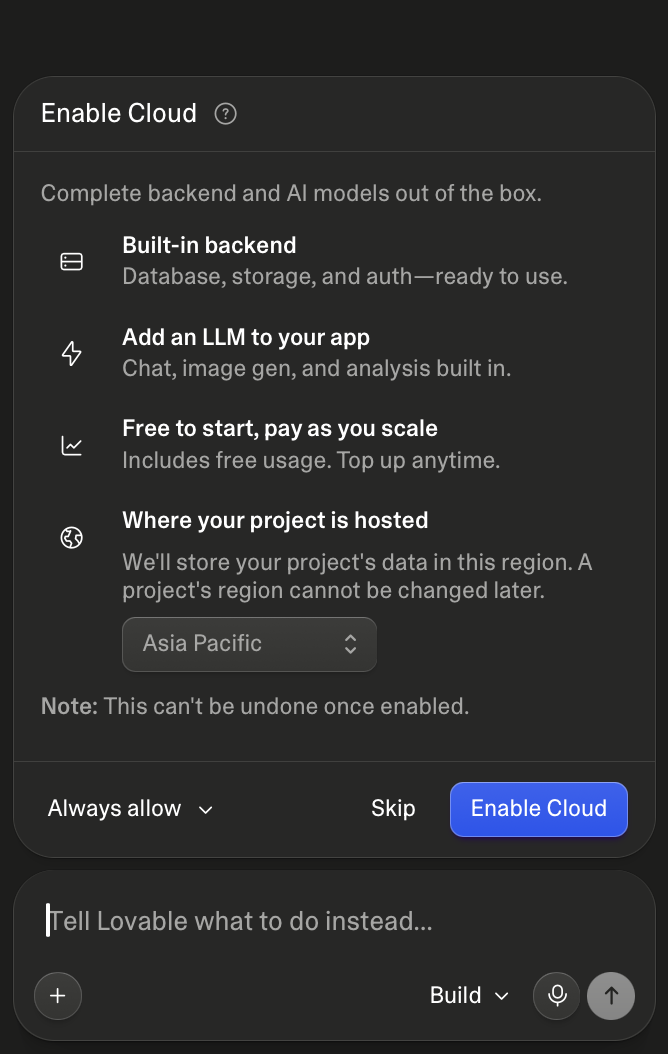
Enable cloud in Lovable
Step 3 — Add Your Volt Credentials
Lovable detects that the prompt needs secrets and will ask for them right in the chat. When asked, enter:
| Secret | Value |
|---|---|
TG_API_KEY | Your Volt Trusted Getaways API key |
TG_API_BASE_URL | https://holidays-volt-sandbox.travclan.com (sandbox) |
These are stored as Lovable Secrets — never as frontend env variables. Switch FD_API_BASE_URL and FD_API_KEY to production (https://holidays-volt-tp.travclan.com) only when you're ready to go live.
Step 4 — Enable Payments (Test Mode)
The prompt uses Lovable's built-in payments for checkout. When Lovable asks, enable payments in test mode, so you can complete bookings end to end without real money.
Step 5 — Let Lovable Build
Lovable will create the database tables, deploy the server functions and build the React website automatically. This takes a few minutes — no manual deploy steps required.
Step 6 — Customize (Optional)
The prompt ships with sensible defaults (white + blue Airbnb-style UI, Thailand, Bali / Indonesia and Kerala as destinations). Common tweaks before pasting:
- Change VITE_APP_NAME / VITE_PRIMARY_COLOR for your brand
- Add or remove destinations in
src/config/brand.ts(destination codes are listed in the FAQs) - Adjust the Routes table if you want different page names or extra steps
Step 7 — Test the Flow
Once Lovable finishes building, walk through the full journey end to end:
Home → Packages → Package Details (date, travellers, add-ons) → Review → Test payment → Confirmation → My Bookings
Confirm a row lands in the bookings table for both a successful and a failed booking attempt.
Prompt ✨
Copy everything inside the block below into Lovable Chat.
# Lovable Prompt: Trusted Getaways — Holiday Package Booking Website

Build **Trusted Getaways**, a holiday-package booking website. Customers browse real trusted getaways holiday packages from our supplier (group trips with fixed dates that bundle flights, hotels, transfers and activities), open a trip, customise it (date, travellers, upgrades, add-ons), pay online, and get a booking they can see again later.

- Use **Lovable Cloud** for the database and server logic (server functions).
- Use **Lovable's built-in payments in test mode** for checkout (hosted checkout page, one-time payment in INR).
- **No sign-in for now.** Every customer books as a guest; their bookings are linked to their browser with a private cookie.
- The browser never calls the supplier and never sees the supplier key. All supplier calls happen on the server.

Customer journey: **Home → packages for a destination → trip detail (date, travellers, upgrades, add-ons) → review (traveller details, price re-check) → hosted checkout → confirmation → My bookings.**

---

## Architecture

```
┌──────────────────┐  calls   ┌───────────────────────────────┐  HTTPS  ┌──────────────────────────┐
│ Website (React)  │ ───────► │ Lovable Cloud server functions │ ──────► │ Supplier Trusted Getaways│
│                  │          │ (supplier proxy, pricing,      │ ◄────── │ API (sandbox/production) │
└───────┬──────────┘          │  checkout, webhooks, sync)     │ webhook └──────────────────────────┘
        │ hosted checkout     └──────┬──────────────┬─────────┘
        ▼                            │              │ payment webhook (verified)
┌──────────────────┐                 ▼              │
│ Lovable payments │ ───────────────────────────────┘
│ (test mode)      │          ┌──────────────────────────────┐
└──────────────────┘          │ Lovable Cloud database        │
                              │ bookings, fd_listings_cache   │
                              └──────────────────────────────┘
```

| Layer | Role |
|---|---|
| **Website** | Browsing, trip customisation, live price display, traveller details. Calls server functions only. |
| **Server functions** | Supplier proxy with the secret key, response validation, re-pricing, checkout creation, payment webhook, supplier booking, supplier webhook, daily sync |
| **Payments** | Hosted checkout in test mode; the verified payment webhook is the only thing that marks a booking paid |
| **Database** | Bookings (every attempt), cached package data |
| **Supplier** | Source of truth for packages, departures, seats, prices and bookings |

---

## Secrets (server only)

Store in Lovable Cloud secrets — never in frontend code or `VITE_*` env.

```env
TG_API_KEY=                     # supplier key, sent as "x-api-key: Bearer <key>"
TG_API_BASE_URL=https://holidays-volt-sandbox.travclan.com
TG_ENV=sandbox                  # sandbox | production
CRON_SECRET=                    # random string; required header for /api/public/fd-sync
TG_WEBHOOK_SECRET=              # empty until the supplier shares signature details
GUEST_KEY_PEPPER=               # random string used when hashing guest access keys
```

Payments keys are managed by Lovable's built-in payments; keep payments in **test mode**.

**Sandbox only until go-live.** Tell the developer explicitly: *`TG_API_BASE_URL` and `TG_API_KEY` are sandbox values. Before going live, switch both to the production values from the supplier, set `TG_ENV=production`, switch payments to live mode, and redeploy. A test-mode payment must never create a production supplier booking: if payments are in test mode and `TG_ENV=production`, refuse to book.*

---

## Database (Lovable Cloud)

```sql
create type booking_status as enum
  ('pending_payment','paid','received','confirmed','failed','refund_needed','cancelled_unpaid');

create table public.bookings (
  id uuid primary key default gen_random_uuid(),
  reference text not null unique,             -- our booking reference, e.g. TG-20261117-4F8K2; sent as buyer_booking_reference
  guest_key_hash text not null,               -- hash of the private guest cookie value
  idempotency_key uuid not null unique,       -- from the Review page; retries return the same booking
  status booking_status not null default 'pending_payment',
  supplier_booking_code text,                 -- provisional code from the supplier Book call
  supplier_final_code text,                   -- final code from the supplier webhook
  supplier_internal_status text,              -- e.g. PENDING
  supplier_http_status int,
  supplier_error_code text,                   -- e.g. PRICE_CHANGED, NO_SEATS
  listing_code text not null,
  departure_code text not null,
  package_title text,
  hero_image_url text,
  travel_start_date date,
  travel_end_date date,
  occupancy jsonb not null,                   -- rooms exactly as sent to the supplier
  travellers jsonb not null,                  -- lead traveller {name,email,phone} + names (and ages) of all travellers
  selections jsonb not null default '{}',     -- hotel_upgrades and add-on codes
  price_breakdown jsonb not null,             -- room lines + extra lines as shown on Review
  amount numeric not null,
  currency text not null default 'INR',
  payment_id text,                            -- checkout session / payment id
  payment_status text,                        -- created | paid | failed | refunded
  is_test boolean not null default true,
  created_at timestamptz not null default now(),
  updated_at timestamptz not null default now()
);
create index bookings_guest_idx on public.bookings (guest_key_hash, created_at desc);

create table public.fd_listings_cache (
  listing_code text primary key,
  destination_code text not null,
  listing jsonb not null,      -- validated item of data.listings
  detail jsonb,                -- validated Detail data
  day_wise jsonb,              -- validated Day-wise data
  synced_at timestamptz not null default now()
);
create index fd_cache_dest_idx on public.fd_listings_cache (destination_code);

alter table public.bookings enable row level security;          -- no policies: browser cannot read or write
alter table public.fd_listings_cache enable row level security;
create policy "public read cache" on public.fd_listings_cache for select using (true);
```

**Access rules**
- The browser **never** reads or writes `bookings` directly. Server functions read a guest's bookings by hashing the guest cookie and matching `guest_key_hash`.
- On the first checkout, the server sets an **HttpOnly, Secure, SameSite=Lax** cookie `tg_guest` with 32 random bytes (1-year expiry) and stores only its hash. Later bookings from the same browser reuse it.
- Only server functions create or update bookings.

---

## Server functions

All return JSON with CORS for the site origin, also on errors.

### Shared request helper

```typescript
async function fd(path: string, init: RequestInit = {}) {
  const res = await fetch(`${Deno.env.get("TG_API_BASE_URL")}${path}`, {
    ...init,
    headers: {
      Accept: "application/json",
      "x-api-key": `Bearer ${Deno.env.get("TG_API_KEY")}`,
      ...(init.method === "POST" ? { "Content-Type": "application/json" } : {}),
    },
  });
  const body = await res.json().catch(() => null);
  return { status: res.status, body };
}
```

On a non-2xx response, return a structured body the frontend can parse. Never pass raw upstream bodies, stack traces or the key to the browser. The one exception is the 409 price change, whose `data` block is passed through:

```json
{ "error": { "code": 409, "kind": "PRICE_CHANGED", "expected_amount": 85000, "requested_amount": 80000, "difference": 5000, "currency": "INR" } }
```

**Validate every supplier response** with zod schemas before using it (`src/lib/fd-schemas.ts`, shared with the server). Invalid or missing fields are dropped, not invented: hide the UI element instead.

### Routes

| Function / route | Method | Supplier call | Purpose |
|---|---|---|---|
| `fd-listings` | GET | `GET /api/v1/fixed-departure/listings?destination_code=&page=&page_size=` | Packages for a destination (serve cache if synced < 24h, else live) |
| `fd-detail` | GET | `GET /api/v1/fixed-departure/listings/{code}` | Trip detail (cache, or `?live=true`) |
| `fd-day-wise` | GET | `GET /api/v1/fixed-departure/listings/{code}/day-wise-itinerary` | Day-by-day plan |
| `quote` | POST | live Detail | Re-check before payment (see flow) |
| `checkout-create` | POST | live Detail | Create the booking row + hosted checkout session |
| `payments-webhook` | POST | `POST /api/v1/fixed-departure/listings/{code}/book` | Verified payment → mark paid → book with supplier |
| `booking-get` | GET | — | One booking by reference, only if the guest cookie matches |
| `bookings-mine` | GET | — | All bookings for this browser's guest cookie |
| `/api/public/fd-webhook` | POST | — (called by supplier) | Final booking code |
| `/api/public/fd-sync` | POST | Listing + Detail + Day-wise | Daily cache refresh; requires header `x-cron-secret: CRON_SECRET` |

### Checkout and booking flow

1. **Review → `quote`.** The site sends `{ listingCode, departureCode, occupancy, selections }`. The server fetches the **live** Detail, checks the departure is still open (today within `booking_start_date`–`booking_end_date`) and has enough seats, checks the room, minimum-adult and seat rules, and re-prices with the pricing module. It returns `{ amount, currency, priceBreakdown, changed, previousAmount }`.
2. **If the price changed** (or the date closed, or seats ran out), the site shows the new price or problem in a dialog and asks the customer to confirm before continuing. Nothing is charged.
3. **Pay → `checkout-create`.** Body: the same trip data + `travellers` (lead name, email, phone; names and ages of all travellers) + `idempotencyKey` (UUID created when the Review page opens). The server re-prices again, then:
   - creates or reuses the guest cookie,
   - creates **one** `bookings` row with status `pending_payment`, a new unique `reference`, the re-checked `amount`, `is_test` = payments test mode,
   - creates a hosted checkout session (INR, one-time, full trip total, `metadata.reference`), stores `payment_id`, and returns the checkout URL.
   - The same `idempotencyKey` returns the existing booking and session; double clicks never create two bookings or two charges.
4. **Customer pays** on the hosted page and returns to `/book/confirmation/{reference}` (success or cancel URL).
5. **`payments-webhook`** (signature verified with Lovable payments): on a successful payment, set `status = paid`, `payment_status = paid`. Then the **server** books with the supplier:
   - Refuse if `is_test` and `TG_ENV=production`.
   - Re-check with live Detail; build the Book body (below) with `buyer_booking_reference = reference`; call Book once (guard with the row status so a repeated webhook never books twice).
   - **200** → `status = received` (seats blocked, provisional booking), save `supplier_booking_code`, `supplier_internal_status`.
   - **409** (price changed) or **400 / 404 / 500** → `status = refund_needed`, save `supplier_http_status` and `supplier_error_code`. The confirmation page tells the customer clearly that the payment will be refunded.
   - Payment failed or expired → `status = cancelled_unpaid`.
6. **Never** mark a booking paid from the browser, and never call Book from the browser.

### Supplier Book request body

Send every field, `[]` when nothing was chosen:

```json
{
  "departure_code": "fddjk5f",
  "buyer_booking_reference": "TG-20261117-4F8K2",
  "occupancy": [
    { "num_of_adults": 2, "child_with_bed_ages": [8], "child_without_bed_ages": [], "infant_ages": [] },
    { "num_of_adults": 1, "child_with_bed_ages": [], "child_without_bed_ages": [4], "infant_ages": [1] }
  ],
  "hotels": ["fhsjk49", "fhsjk4a"],
  "hotel_upgrades": [{ "base_hotel": { "code": "fhsjk49" }, "upgrade_hotel": { "code": "fhsjkyg" } }],
  "sightseeings": ["ssgjzls", "ssgjzxo", "ssgjzxe"],
  "sightseeing_addon_codes": ["fsajky9"],
  "transfers": ["fdtjk4w", "fdtjk4i", "fdtjk40"],
  "transfer_addon_codes": [],
  "flights": ["flsjkyz"],
  "flight_origin_addon_codes": [],
  "total_amount": 452000,
  "currency": "INR"
}
```

| Field | Source |
|---|---|
| `departure_code` | `data.departures[].code` of the selected departure |
| `buyer_booking_reference` | **Mandatory.** Our own unique reference, also used as the payment reference. The webhook sends it back. |
| `occupancy` | One item per room, from the travellers picker, with each child's and infant's age |
| `hotels` | `data.hotels[].code` of every included stay |
| `hotel_upgrades` | One item per chosen upgrade: `base_hotel.code` = `hotels[].code`, `upgrade_hotel.code` = `hotels[].upgrades[].code` |
| `sightseeings` | `data.sightseeings[].sightseeing.code` |
| `sightseeing_addon_codes` | `data.addons[].code` of chosen optional activities |
| `transfers` | `data.transfers[].transfer.code` |
| `transfer_addon_codes` | `data.transfers[].addons[].code` of chosen transfer add-ons |
| `flights` | `data.flights[].code` |
| `flight_origin_addon_codes` | `data.flights[].outbound.origin_addons[].code` of the chosen start city |
| `total_amount`, `currency` | Our calculated total; `data.departures[].currency` |

The Book API does **not** take traveller documents or traveller details. Do not send them. Traveller details are stored only in our `bookings.travellers`; after a successful booking the confirmation page tells the traveller that documents will be collected.

### `/api/public/fd-webhook` (supplier → us)

The supplier calls this when a booking is confirmed:

```json
{ "type": "FINAL_BOOKING_CODE_ASSIGNED", "quote_code": "qf9v8", "requirement_code": "lkw76", "booking_code": "tr6gh", "buyer_booking_reference": "TEST-BUY-1" }
```

- **Verify the supplier's signature before changing anything.** Until `TG_WEBHOOK_SECRET` and the signature details are configured, return **501 Not available** and change nothing (bookings stay `received`).
- When verified: find the booking by `reference = buyer_booking_reference`, set `supplier_final_code`, `status = confirmed`, `updated_at`. Unknown references return 200 and are logged.
- This `booking_code` is the **final** code; it differs from the provisional `supplier_booking_code`.

### `/api/public/fd-sync` (daily)

Schedule daily (for example 02:00 IST) with the header `x-cron-secret`. Reject other calls with 401. For every destination in the brand settings, page through Listing, fetch Detail and Day-wise for each listing, validate, upsert `fd_listings_cache`, and delete listings no longer returned. The trip page reads the cache; `quote`, `checkout-create` and the payment webhook always use live Detail.

---

## Supplier response contracts

All responses are `{ "status": 200, "data": ... }`.

### Listing — `data`

| Key | Use |
|---|---|
| `count` | "N packages" |
| `listings[]` | One card each, in API order |
| `listings[].code`, `title`, `destination_name`, `nights_count`, `star_category` | Card text and link |
| `listings[].images[]` (`url`, `is_hero`) | Card carousel; hero first |
| `listings[].hotels[]` (`hotel.area_name`, `rooms[].rooms[].nights_count`) | Route line, e.g. "3N Pattaya → 1N Bangkok" |
| `listings[].departures[]` | Price, seats and dates (see departure rule) |
| `listings[].marketing_prices.adult` (`hotel` + `flight` + `land`) | Struck-through market price |

**Which departure a card shows:** the earliest `travel_start_date` among departures where today is between `booking_start_date` and `booking_end_date` and `total_available > 0`. If none qualifies, show the card as "Sold out".

### Detail — `data` (same keys as a listing item, plus)

| Key | Use |
|---|---|
| `description`, `inclusions`, `exclusions`, `payment_policy`, `cancellation_policy` | HTML: sanitize, then render lists as rows |
| `departures[]` | Date picker. Per departure: `code`, `travel_start_date`, `travel_end_date`, `booking_end_date`, `total_available`, `adult_price`, `single_adult_price`, `child_price_with_bed`, `child_price_without_bed`, `infant_price`, `currency`, `max_age_child_with_bed`, `max_age_child_without_bed`, `max_age_infant`, `min_occupancy`, `max_occupancy` |
| `hotels[]` | `code`, `hotel.name`, `hotel.area_name`, `meal_type`, `day_of_trip`, `rooms[].rooms[]` (`name`, `nights_count`), `upgrades[]` |
| `hotels[].upgrades[]` | `code`, `hotel`, `meal_type`, `upgrade_adult_price`, `upgrade_single_adult_price`, `upgrade_child_price_with_bed`, `upgrade_child_price_without_bed`, `upgrade_infant_price` |
| `sightseeings[]` | `sightseeing.name`, `sightseeing.code`, `sightseeing.images[]`, `type` (SIC, PRIVATE, TICKETS_ONLY), `day_of_trip` |
| `addons[]` | Optional activities: `code`, `sightseeing.name`, `type`, `day_of_trip`, `adult_price`, `child_price`, `infant_price` |
| `transfers[]` | `transfer.code`, `transfer.transfer_type`, `transfer.routes[]` (`transfer_mode.name`), `addons[]` (`code`, `transfer_type`, `adult_price`, `child_price`, `infant_price`) |
| `flights[]` | `code`, `is_primary`, `day_of_trip`, `outbound`, `inbound` (may be `null`), segments with `airline`, `origin`, `destination`, `duration` (minutes), `baggage`, `cabin_class`; `outbound.origin_addons[]` (`code`, `home_origin_city`, `flight_origin`, `adult_price`, `child_price`, `infant_price`) |

`hotels[].addons[]` and `hotels[].upgrades[].addons[]` (types ROOM and MEAL, e.g. "Single sofa cum bed") are **not accepted by the Book API**. Show them view-only under the hotel card, labelled "Request at the hotel" — no Add button, never in the total or the booking request.

### Day-wise Itinerary — `data[]`

One item per day: `dayCount`, `areaName` (city, may be `null`), `components[]`. `itemType: 2` is a transfer (`title`, `pickUpPoint`, `dropPoint`, `mode`, `transferType`, `code`); `itemType: 0` is an activity (`title`, `transferType`, `code`, `additionalDetails.images[]`). Hotels and flights are **not** in this response; add them from Detail.

### Book — success (200)

Keys: `booking_code` (provisional), `buyer_booking_reference`, `status` (`CONFIRMED`), `internal_booking_status` (`PENDING` until TravClan confirms), `booking_amount`, `currency`, `travel_start_date`, `travel_end_date`, `request_body.occupancy`, `listing` (the package). A 200 means **seats are blocked and a provisional booking exists**; it is confirmed later, after the traveller's documents arrive.

### Book — errors

| Status | When |
|---|---|
| `401` | Missing or invalid API key |
| `404` | Listing not found, or not bookable for the organisation |
| `400` | Invalid body, occupancy, components, inventory or currency |
| `409` | Price mismatch — `{ message: "Prices have changed", data: { requested_amount, expected_amount, difference, currency } }` |
| `500` | Unexpected error |

---

---

## Pricing and booking rules (shared module)

Put all of this in **one pure TypeScript module** used by the website (`src/lib/pricing.ts`) and by the server functions `quote`, `checkout-create` and `payments-webhook` (`_shared/pricing.ts`, identical code). No UI code inside. Cards, totals, Review and the booking request must all come from this module so they never disagree. Short names: SAP single adult price, AP adult, CWBP child with bed, CWOBP child without bed, IP infant — all from the selected departure.

### Traveller age bands (per departure)

- Infant: 0 to `max_age_infant` (a 2-year-old is an infant when `max_age_infant` is 2)
- Child with bed: `max_age_infant + 1` to `max_age_child_with_bed`
- Child without bed: `max_age_infant + 1` to `max_age_child_without_bed` (can be lower than with bed — read both)
- Adult: above `max_age_child_with_bed`

### Room rules (each room checked on its own)

1. Every room needs at least one adult.
2. A room holds up to `max_occupancy` travellers (DOUBLE = 2, TRIPLE = 3), infants included.
3. Exception — one extra infant with two or more adults: DOUBLE allows 2 adults + 1 infant; TRIPLE allows 3 adults + 1 infant, 2 adults + 1 child with bed + 1 infant, 2 adults + 1 child without bed + 1 infant.
4. Any other mix is invalid.

### Booking checks

- Total adults across all rooms ≥ `min_occupancy` (DOUBLE = 2, TRIPLE = 3). Children and infants do not count.
- Seats needed = adults + children (infants take no seat) ≤ `total_available`.

### Room price

- 2+ adults: `adults × AP + cwb × CWBP + cwob × CWOBP + infants × IP`
- 1 adult, alone: `SAP`
- 1 adult with others: the **lower** of
  - Option A: `SAP + cwb × CWBP + cwob × CWOBP + infants × IP`
  - Option B: `2 × AP + everyone else at their own price`, where one companion is charged AP instead of their own price — a child with bed if any, otherwise a child without bed, otherwise an infant.

### Hotel upgrade price (per room)

The same rule as the room price, using the upgrade rates (`upgrade_adult_price` as AP, `upgrade_single_adult_price` as SAP, and so on). The lower-of-two choice is made separately for the upgrade.

### Add-ons (per traveller)

`adults × adult_price + (children with and without bed) × child_price + infants × infant_price`, for each chosen optional activity, transfer add-on and start-from-another-city add-on.

### Grand total

`Σ rooms (room price + upgrade price) + Σ chosen add-ons`

### Unit tests (required — must pass)

| Case | Prices | Expected |
|---|---|---|
| 1 room, 2 adults | AP 48,000 | 96,000 |
| Room 1: 2 adults · Room 2: 1 adult + 1 child with bed + 1 infant | SAP 63,000, AP 48,000, CWBP 48,000, IP 8,000 | 96,000 + min(1,19,000, 1,04,000) = **2,00,000** |
| Room 1: 2 adults + child with bed · Room 2: 1 adult + child without bed + infant | SAP 55,000, AP 40,000, CWBP 30,000, CWOBP 25,000, IP 5,000 | 1,10,000 + 85,000 = **1,95,000** |
| Room 1: 1 adult + child with bed + infant, with upgrade · Room 2: 2 adults | AP 40,000, SAP 55,000, CWBP 30,000, IP 5,000; upgrade AP 8,000, SAP 12,000, CWBP 5,000, IP 1,000 | 85,000 + 17,000 + 80,000 = **1,82,000** |
| 2 adults + 1 child + 1 infant take an activity | adult 3,000, child 2,000, infant 1,000 | **9,000** |
| 1 adult in 1 room, DOUBLE departure | — | Booking fails (min adults) |
| Room with 2 adults + 1 child with bed, DOUBLE departure | — | Invalid room |

---
---

## Frontend

Use the project's default Lovable stack (React + TypeScript + Tailwind + shadcn/ui) with: TanStack Query for data, Zustand for trip state, zod for validation, Embla for carousels, DOMPurify for supplier HTML.

### Routes

| Route | Page |
|---|---|
| `/` | Home — hero with destination search, trust row, destination cards, featured trips |
| `/packages?destination=<code>` | Packages for a destination |
| `/package/$code` | Trip detail — photos, booking box, highlights, day-wise plan with add-ons, inclusions, things to know |
| `/book/review` | Review — trip, rooms and prices, extras, lead traveller and traveller names, re-check, Pay |
| `/book/confirmation/$ref` | Booking status after checkout (polls `booking-get` until it leaves `paid`) |
| `/bookings` | My bookings in this browser |

Trip state is kept in the URL on the trip page so it can be shared: `?departure=fddjk5f&rooms=2-1-0-0,1-0-1-1&addons=fsajky9&upgrade=fhsjk49:fhsjkyg` (rooms are `adults-childWithBed-childWithoutBed-infants`).

**Only real supplier data on listing and trip pages.** Never show sample or demo prices, dates or photos. If a field is missing, hide that element.

**Every page sets its own `<title>` and meta description** (and Open Graph title, description and image for sharing), e.g. "4N Pattaya Bangkok EX-DEL — 17 Nov · Trusted Getaways".

---

## Visual Design — Airbnb-like design sense

Aim for a calm, photo-first, premium travel feel in the spirit of Airbnb: white background, generous white space, large rounded photos, rounded cards with soft shadows, quiet typography and **one strong blue** for buttons and chips. Take the principles, not the brand (no Airbnb logo, name or illustrations).

**Blue chips and blue buttons always use white text — never black.**

### Principles

1. **Photos lead.** Package images are the largest element on every browsing screen. Text sits below images, never on top, except small badges.
2. **One clear action per screen.** The primary button (brand primary colour, white text) is the only saturated element; everything else is neutral.
3. **Quiet hierarchy.** Few font sizes, weight for emphasis rather than colour, grey for secondary text.
4. **Soft, consistent shapes.** Cards and images 12–16px radius, pills fully rounded, inputs 10px.
5. **Trust signals close to the price.** Seats left, market price struck through, "Free day" and policy summaries near the booking panel.
6. **Nothing jumps.** Skeletons with the same size as the content, images with fixed aspect ratios, state changes update in place (sheets and dialogs never re-mount or replay animations when a count changes).

### Design tokens

| Token | Value |
|---|---|
| Font | Inter (or system UI stack) — 400, 500, 600, 700 |
| Type scale | 12 · 14 · 16 (body) · 18 · 22 · 28 · 36/44 (hero) |
| Line height | 1.5 body, 1.2 headings |
| Spacing scale | 4 · 8 · 12 · 16 · 24 · 32 · 48 · 64 · 96 |
| Radius | 8 (chips), 12 (cards), 16 (images, panels), 999 (pills) |
| Shadow | Card hover `0 6px 16px rgba(0,0,0,.12)`; floating panel `0 6px 20px rgba(0,0,0,.18)` |
| Neutrals | Text `#222222`, secondary `#6A6A6A`, border `#DDDDDD`, surface `#F7F7F7` |
| Accent | `brand.colors.primary` for CTAs, selected states, links |
| Status | Seats-left orange `#C2410C` on `#FFF1E6`; success `#1E8A4C`; error `#C13515` |
| Motion | 150–250ms ease-out; respect `prefers-reduced-motion` |
### Responsive layout

Mobile-first. Breakpoints `sm 640`, `md 768`, `lg 1024`, `xl 1280`. Content max width 1280px; side padding 16px (mobile), 24px (tablet), 40–80px (desktop). **No sideways scrolling at 360, 768, 1024 and 1440 px.** Touch targets at least 44 × 44px.

| Element | Phone (< 768) | Tablet (768–1023) | Desktop (≥ 1024) |
|---|---|---|---|
| Header | Logo + menu; "Where to?" pill | Logo, search pill, My bookings | Logo left, destination search pill centre, "My bookings" right; compact and sticky on scroll |
| Package grid | 1 column | 2 columns | 3 columns (lg), 4 (xl) |
| Trip photos | **Only the large photo**, with a "1 / N" count; tap opens all photos | Large photo + 2 small | **Photo grid:** one large photo left, up to 4 smaller right, "Show all N photos" button |
| Booking box | **Bar fixed to the bottom of the screen**: trip total, selected date, traveller count, Book now | Bottom bar | **Sticky booking box** beside the photos and content (top offset 96px) |
| Pop-ups (date, travellers, upgrades) | Open from the bottom (sheet, max 88% height, scrolls inside) | From the bottom | Centred dialog (max 560px), or popover anchored to the booking box for date and travellers |
| Review page | Single column, pay bar at the bottom | Single column | Two columns: details left, sticky price card right |

### Components

**Package card** (listing grid and featured trips)
- Hero photo (4:3, radius 16) with carousel dots when there are several photos
- Badges: first tag (e.g. "Honeymoon") top-left; **🔥 Only N seats left** top-right when 5 or fewer seats remain
- Title (16, 600), "4N · 5D · ⭐ 4-star", route line ("3N Pattaya → 1N Bangkok")
- **Next departure** ("Next: Tue, 17 Nov")
- **"from ₹48,000 / adult"** plus the market price struck through
- Whole card links to the trip; cards with no open departure show "Sold out"

**Home**
- Hero: large rounded image band, headline and sub-line from brand settings, destination search pill ("Where do you want to go?" → destination list → "Explore")
- **Trust row**: 3–4 short points with emoji, e.g. "✈️ Flights included", "🏨 Handpicked hotels", "🧭 Fixed dates, small groups", "🔒 Secure payment"
- Destination cards (photo from the first listing of each destination, name, number of trips)
- Featured trips: earliest open departures across destinations

**Trip detail — first screen** (on desktop everything below fits above the fold without scrolling)
- Breadcrumb: Home › Thailand › 4N Pattaya Bangkok EX-DEL
- Title (28, 600) and a summary line: **"4 nights · 6 days · 4-star stays"** (days from the selected departure's dates)
- Photo grid as in the responsive table. Use all supplier photos, hero first. "Show all N photos" and clicking **any** photo opens a full-screen gallery (keyboard and swipe navigation, close on Escape).
- **Booking box** (sticky on desktop): price per adult (market price struck through), the **selected departure** with seats left and "Change", the **travellers and rooms** with "Change", a **"Your extras"** list (each line removable), the **trip total**, and **Book now**. Rule messages appear above Book now and disable it.
- **Phone bottom bar**: trip total, selected date, traveller count, Book now.

**Trip detail — content**
- Emoji highlights: ✈️ Flights, 🏨 Hotels, 🚌 Transfers, 🎟️ Activities, 🍳 Breakfast — only those actually included
- **"Your getaway"**: the sanitized description, clamped to 4 lines with "Show more"
- **Day-wise plan** built by `buildItinerary()` with add-ons on their days (sections below)
- **"What's included"**: ✅ each included line, ❌ each not-included line (first 5 of each + "Show all")
- **"Things to know"**: 💳 Payment policy and ↩️ Cancellation policy (accordions)

**Choose departure (popup only)**
- **Never list all departure dates on the page.** The page shows only the selected departure inside the booking panel / bottom bar. On first load, preselect the earliest departure that is open for booking with seats left (the same rule as the listing card).
- Tapping the Departure field or "Change" opens the **departure picker**: a **bottom sheet** on mobile and tablet, a **popover anchored to the booking panel** (or a centred dialog, max 560px) on desktop.
- Inside: month tabs (only months that have departures), then one option per departure showing the date range, weekday, seats left ("Only 3 seats left" in orange when ≤ 5) and price per adult. Sold-out or closed departures are shown greyed out and disabled with "Sold out" / "Booking closed".
- Selecting an option highlights it; **"Confirm date"** applies it and closes the popup. Closing without confirming keeps the old date.
- Changing the departure re-runs prices, age bands, seat checks and the itinerary dates; if the current travellers break the new departure's rules, show the rule message in the panel.
- Sync the chosen departure to the URL (`?departure=`).

**Travellers picker**: per room — Adults, Children with bed, Children without bed, Infants, each with its age band label from the departure (e.g. "3 to 12 years"); age dropdown for each child and infant; "Add another room" (max 3); live rule messages ("Room 2 needs at least one adult", "This departure needs at least 2 adults", "Only 10 seats left"). Updating a count changes state in place — never re-open or re-animate the sheet.

### Day-wise itinerary assembly (`src/lib/itinerary.ts`)

The plan merges two responses: **Day-wise Itinerary** gives the days, cities, transfers and activities; **Detail** gives the hotels, flights and add-ons. Build it in one pure function, unit-tested, and render only its output.

```typescript
type DayItem =
  | { kind: "flight"; flightCode: string; leg: "outbound" | "inbound" | "other"; segments: Segment[]; originAddons: OriginAddon[] }
  | { kind: "transfer"; code: string; title: string; from: string; to: string; mode: string; type: string; addons: TransferAddon[] }
  | { kind: "hotel_checkin"; stayCode: string; hotel: Hotel; roomName: string; mealType: string; nights: number; upgrades: Upgrade[] }
  | { kind: "hotel_stay"; stayCode: string; hotelName: string; night: number; nights: number }   // continuing nights
  | { kind: "activity"; code: string; title: string; type: string; image?: string }
  | { kind: "optional_activity"; addon: SightseeingAddon }
  | { kind: "leisure" };

type DayVM = { dayCount: number; date: string; city: string | null; items: DayItem[] };

function buildItinerary(detail, dayWise, departure): DayVM[]
```

**Steps**

1. **Days.** One `DayVM` per item of Day-wise `data`, sorted by `dayCount`. `date = travel_start_date + (dayCount − 1)` from the selected departure. `city = areaName`; when `null`, hide the city.
2. **Transfers and activities.** Copy each `components[]` entry in the order returned: `itemType 2` → `transfer` (title, `pickUpPoint` → `dropPoint`, vehicle from `mode`, shared or private from `transferType`, number of cabs from `totalCabs`, `code`) — shown as "Bus (occupancy 10) · Shared · 1 cab", `itemType 0` → `activity` (title, `transferType`, first `additionalDetails.images[]`).
3. **Attach transfer add-ons.** For each `transfer` item, find `detail.transfers[]` whose `transfer.code` equals the component `code`; attach its `addons[]`.
4. **Hotels.** For each `detail.hotels[]` stay: `nights = rooms[0].rooms[0].nights_count`.
   - On day `day_of_trip`, add a `hotel_checkin` item (hotel name, room name, meal plan, nights) and attach `upgrades[]`. Place it **after the transfer whose `dropPoint` matches the hotel name**; if there is no such transfer, after the last transfer of that day; if there are no transfers, first in the day.
   - On each following night of the stay (`day_of_trip + 1` … `day_of_trip + nights − 1`), add a compact `hotel_stay` row ("Staying at Mind Resort · night 2 of 3") at the end of the day.
   - If two stays overlap or `day_of_trip` is outside the days, keep the stay on its `day_of_trip` (clamp to the first or last day) and never drop it.
5. **Flights.**
   - **Primary flight** (`is_primary: true`): the outbound goes **first on Day 1**, with `outbound.origin_addons[]` attached. The inbound goes **last on the last day**, only when `inbound` is not `null` and has at least one segment.
   - **Non-primary flights** (`is_primary: false`): the outbound goes on the day in `day_of_trip`, first in that day; if `inbound` has segments, place it on the last day after the primary inbound.
   - **Several segments:** one flight card with the segments in order. Between segments, show the layover ("Layover at KUL · 1h 40m" from `stop_over_point` / `ground_time`). Never split one flight across days and never repeat a flight.
   - Card fields: airline name + flight number, origin and destination airport codes with terminal, departure and arrival times, "+1 day" when arrival is earlier than departure, duration (`duration` minutes → "4h 05m"), stops, check-in and cabin baggage, cabin class.
6. **Optional activities.** For each `detail.addons[]`, add an `optional_activity` item on its `day_of_trip`, after that day's included activities.
7. **Leisure days.** A day is a **leisure day** when it has no transfer, no activity, no flight and no `hotel_checkin`. Add a `leisure` item first ("Day at leisure — free time to explore {city}"). If optional activities fall on that day, show them **below the leisure note** as suggestions ("Make the most of your free day"). `hotel_stay` rows still show at the end.
8. **Order within a day:** outbound flight → transfers and activities in API order, with the hotel check-in inserted as in step 4 → optional activities → `hotel_stay` → inbound flight.

**Unit tests for `buildItinerary`**: using the 4N Pattaya Bangkok EX-DEL data — XJ231 first on Day 1 with its start-city add-on; Mind Resort check-in on Day 2 after the "Arrival" transfer, "night 2 of 3" and "night 3 of 3" rows on Days 3 and 4; Day 4 has no included items so it shows the leisure note with the optional activity below it; Cross Vibe check-in on Day 5 after "Inter hotel transfer", with the transfer add-on attached; XJ230 last on Day 6. A primary flight with `inbound: null` adds nothing to the last day. A two-segment flight renders as one card with one layover.

### Add-ons in the day-wise plan (UI)

Add-ons live **on the day and item they change**, never in a separate block. Show an add-on control only when that add-on exists in the response.

| Add-on (source) | Where it appears | Control | Picker content |
|---|---|---|---|
| Start from another city (`flights[].outbound.origin_addons[]`) | Primary outbound flight card, Day 1 | Link "Start from another city ›" | Radio list: the included city (`outbound.origin`, "Included") and each `home_origin_city` ("Connects to the {flight_origin} flight") with extra price per adult, child, infant. One choice. |
| Hotel upgrade (`hotels[].upgrades[]`) | The hotel check-in card on its day | Link "See upgrade options ›" | Radio list: the included hotel ("Included") and each upgrade hotel with photo, area, room name, **meal plan chip** (from `upgrades[].meal_type`, e.g. "Half board"), and extra price per adult, child with bed, child without bed, infant. One choice per stay. |
| Transfer add-on (`transfers[].addons[]`) | The matching transfer card on its day | Link "Upgrade transfer ›" | Radio list: the included transfer ("Shared (SIC)", vehicle) and each add-on (`transfer_type`, e.g. "Private transfer — just your group") with extra price per adult, child, infant. One choice per transfer. |
| Optional activity (`addons[]`) | Its own card on its `day_of_trip`, also on leisure days | "Add" toggle button on the card | No picker. Card shows the **Optional** tag, name, type (SIC / PRIVATE / TICKETS_ONLY), and price per adult with child and infant prices. |

**Room extras the supplier can't book** (`hotels[].addons[]`, e.g. "Single sofa cum bed"): show a muted line under the hotel card — "🛏️ Single sofa cum bed · Request at the hotel" — with no toggle and no price in the total.

**Pickers**: bottom sheet on mobile and tablet, centred dialog (max 560px) on desktop. The included option is preselected. The confirm button reads "Select upgrade" / "Select city" when an add-on is chosen, and "Keep included" when the included option is chosen. Closing without confirming changes nothing.

**Card states**

| State | Flight / hotel / transfer card | Optional activity card |
|---|---|---|
| Not chosen | Link "… ›" under the card details | Dashed border, **Optional** tag, "Add" outline button |
| Chosen | Card content switches to the chosen option (e.g. hotel name → "Pan Pacific", meal plan updated), plus a green pill "Upgraded" / "Private" / "Starts from Jaipur (JAI)" with a "Change" link | Solid accent border, "Added ✓" filled button; tapping again removes it |

**Prices on add-ons**: show the extra price per adult in bold ("+₹35,000 per adult") and the child / infant prices on a second line. Never show multiplied totals on the card; the effect on the trip appears only in the live total and in the review breakdown.

**State and totals**: selections live in the trip store (`hotelUpgrades: Record<stayCode, upgradeCode>`, `transferAddons: Record<transferCode, addonCode>`, `originAddon: string | null`, `sightseeingAddons: string[]`). Every change updates the live total, the "Your extras" list in the booking panel, the URL, and a short toast ("Added to your trip" / "Removed from your trip"). Changing the departure or travellers keeps the selections and re-prices them. All selections map to the Book body: `hotel_upgrades`, `transfer_addon_codes`, `flight_origin_addon_codes`, `sightseeing_addon_codes`.

**Review booking** lists each chosen add-on on its own line with its total ("Hotel upgrade — Pan Pacific, Pattaya · Half board"), below the room lines.

### Selection states — keep every related card in sync (required)

Every add-on choice is a single piece of state in the trip store. **Every card that shows that add-on, its item or its price must re-render from that state immediately**: no reload, no stale card anywhere on the page, and no re-mount or re-animation of open sheets. Removing an add-on reverts every one of these places.

| When the traveller… | Update these places (all of them) |
|---|---|
| **Selects a hotel upgrade** | The hotel check-in card switches to the upgrade hotel (name, area, room, photo) with the meal plan chip from `upgrades[].meal_type` and a green "⭐ Upgraded" pill with "Change"; **every "Staying at …" row for that stay** shows the upgrade hotel name; the booking panel / bottom bar total and the "Your extras" list ("🏨 Pan Pacific · Half board"); the upgrade sheet reopens with the upgrade preselected; Review shows a "Hotel upgrade" line |
| **Selects a transfer add-on** | That transfer card's subtitle becomes the add-on type ("Private transfer — just your group"), its icon changes 🚌 → 🚗, and a green "Private" pill with "Change" appears; total and "Your extras" update; the sheet reopens with the add-on preselected; Review shows a "Transfer upgrade" line |
| **Selects a start city** | The Day 1 flight card shows a connecting line above the flight ("✈️ Starts from Jaipur (JAI) · connects to DEL") and a green pill with "Change"; total and "Your extras" update; the sheet reopens with that city preselected; Review shows a "Start from another city" line |
| **Adds an optional activity** | The activity card switches to the selected style (solid accent border, filled "Added ✓" button, `aria-pressed="true"`); on a leisure day the leisure note changes to "🌴 Free day — you added {activity}"; total and "Your extras" update; Review shows an "Optional activity" line |
| **Removes any add-on** (from its card, its sheet, or the "Your extras" list) | All of the above revert to the not-chosen state in one update |
| **Changes travellers or departure** | Keep all selections; re-price every add-on line and the total; refresh the dates on every day card; if a rule now fails, show the message in the booking panel and disable "Book now" |

**Visual language for states** (use the same everywhere):

| State | Style |
|---|---|
| Not chosen | Neutral card; add-on offered as a link ("See upgrade options ›") or an outline "Add" button |
| Chosen | Accent border (2px, `brand.colors.primary`) or tinted background, green pill naming the choice, "Change" or "Added ✓" control |
| Updating price | Total shows a short shimmer (≤ 300ms); never blank |
| Disabled (rule broken) | Greyed "Book now" with the rule message above it |

**Implementation rules**

1. One source of truth: `tripStore` holds `hotelUpgrades`, `transferAddons`, `originAddon`, `sightseeingAddons`. Cards, sheets, the booking panel, the bottom bar, the URL and Review all derive from it with selectors; never copy selections into local component state.
2. Derive display data with memoised selectors (`selectItinerary(trip)`, `selectTotal(trip)`, `selectExtras(trip)`) so a change re-renders only the affected cards.
3. Sheets keep their own **draft** choice while open and write to the store only on confirm; cards update the moment the store changes.
4. Accessibility: chosen controls use `aria-pressed` / `aria-checked`; announce changes politely through a live region ("Pan Pacific added to your trip").
5. Show a short toast for each change ("Added to your trip" / "Removed from your trip"), never more than one at a time.
6. Tests: selecting and removing each add-on type updates the itinerary card, the "Staying at" rows (for hotel upgrades), the extras list, the total and the Review lines.

**Review and checkout** (`/book/review`)
- Trip card (photo, title, dates, nights), travellers and rooms with Edit (back to the trip page)
- **Price, room by room** ("Room 1 · 2 adults — ₹96,000"), then one line per extra ("Hotel upgrade — Pan Pacific · Half board — ₹1,90,000"), then the trip total. **Never show the calculation** (no "2 × ₹48,000") — only line totals.
- **Traveller details**: lead traveller full name, email and phone (with country code); then the full name of every traveller, grouped by room, with the age already chosen for each child and infant. Validate all fields before Pay.
- 💳 Payment policy summary and a consent checkbox ("I agree to the payment and cancellation policy").
- **Pay ₹X** calls `quote` first. If anything changed (price, seats, date closed), show a dialog with the new total or the problem and "Confirm new price" / "Change trip". Then `checkout-create` and redirect to the hosted checkout. The button shows a spinner and is disabled while working.

**Confirmation** (`/book/confirmation/$ref`)
- While the booking is `pending_payment` or `paid`: "⏳ Confirming your booking…" and poll every 3 seconds (stop after 2 minutes with a friendly "This is taking longer than usual — we'll email you").
- `received`: **⏳ "Booking received — awaiting confirmation"**. Our documents note: "Our team will contact you for travel documents; your final booking code will appear here."
- `confirmed`: **✅ "Booking confirmed"** with the final booking code.
- `refund_needed`: **⚠️ "We couldn't complete your booking."** "Your payment of ₹X will be refunded. Reference TG-…" and a support contact.
- `cancelled_unpaid`: "Payment wasn't completed" with "Try again" back to Review.
- Always show: reference number, trip summary (photo, title, dates), travellers, extras, amount paid and payment status.

**My bookings** (`/bookings`)
- Bookings made in this browser (from `bookings-mine`): photo, title, dates, status pill (Pending payment, Paid, Received ⏳, Confirmed ✅, Failed / Refund needed ⚠️), amount, reference; each opens its confirmation page.
- Empty state: "No bookings in this browser yet" with a link to explore trips. Explain that bookings are saved on this device.

**Loading and empty states**: skeleton cards and gallery; "No packages for this destination yet" with destination chips; "Sold out" overlay on cards with no bookable departure.

### Indicative icons and emoji (required)

Use a small, consistent set of emoji as visual markers wherever a list or item has a type or a yes/no meaning. Each emoji sits in a fixed-size slot (20px, or a 32px rounded tinted tile on itinerary cards), is marked `aria-hidden="true"`, and is always followed by a text label, so screen readers and colour-blind users lose nothing. Never use an emoji as the only label of a button.

| Where | Emoji | Notes |
|---|---|---|
| **What's included** — every list item | ✅ | Green; one per line, left-aligned, text wraps under the text not under the icon |
| **Not included** — every list item | ❌ | Red; same layout as included |
| Highlights row (detail page) | ✈️ Flights · 🏨 Hotels · 🚌 Transfers · 🎟️ Activities · 🍳 Breakfast | Show only the ones the package has |
| Itinerary — flight card | ✈️ | Tile tint blue |
| Itinerary — transfer card | 🚌 shared (SIC) · 🚗 private | Tile tint green |
| Itinerary — hotel check-in / staying | 🏨 | Tile tint amber |
| Itinerary — activity | 🎭 shows · 🚤 water · 🛕 temples / heritage · 🎟️ tickets only · 📍 other | Pick from the activity name; default 📍 |
| Itinerary — optional activity | ✨ plus the activity emoji | "Optional" tag in purple |
| Itinerary — day at leisure | 🌴 | "Day at leisure — free time to explore {city}" |
| Flight details | 🕒 duration · 🧳 baggage · 🔁 layover | Inline before each value |
| Hotel details | ⭐ star category · 🍳 meal plan · 🛏️ room type | Inline |
| Seats left badge | 🔥 when ≤ 5 seats, otherwise none | "🔥 Only 3 seats left" |
| Payment policy | 💳 | Accordion header |
| Cancellation policy | ↩️ | Accordion header |
| Departure / travellers fields | 📅 departure · 👥 travellers | In the booking panel |
| Booking status | ✅ confirmed · ⏳ received / awaiting confirmation · ⚠️ failed or refund needed | Large, in a round coloured badge; also on status pills in My bookings |
| Price changed (409) | 💱 | With the new total |

Rules: one emoji per line item, same emoji for the same meaning everywhere, never decorative emoji in headings or body copy. Inclusions and exclusions come from supplier HTML: strip any existing bullets or icons from the HTML, then render each `<li>` with ✅ or ❌.

### Accessibility

WCAG AA contrast; visible focus rings (2px primary, offset 2px); all icon buttons labelled; dialogs and sheets trap focus, close on Escape and return focus to the trigger; carousels keyboard-operable; prices announced with currency; form errors linked with `aria-describedby`.

---

---

## Branding & Theme (single change point)

All names, logo, colours and destinations come from `src/config/brand.ts`:

```typescript
export const brand = {
  name: import.meta.env.VITE_APP_NAME ?? "Trusted Getaways",
  logoUrl: "/logo.svg",
  colors: {
    primary: import.meta.env.VITE_PRIMARY_COLOR ?? "#2453C4",
    secondary: import.meta.env.VITE_SECONDARY_COLOR ?? "#16357F",
    background: import.meta.env.VITE_BG_COLOR ?? "#FFFFFF",
    onPrimary: "#FFFFFF",          // text on blue chips and buttons — never black
    text: "#222222",
    muted: "#6A6A6A",
    border: "#DDDDDD",
  },
  hero: { headline: "Group trips with fixed dates,", sub: "planned end to end." },
  destinations: [
    { code: "desjky4", name: "Thailand" },
    { code: "desjk4c", name: "Bali / Indonesia" },
    { code: "desjkyd", name: "Kerala" },
  ],
} as const;
```

Never hardcode the name, logo, colours or destinations in pages. Tailwind `theme.extend.colors.brand.*` reads these values. The server functions (sync) use the same destination list. More destinations are added only here.

---

## UI Error Rules (all pages)

Never show "TravClan", "Volt", "API", "Edge Function", "Supabase", "Lovable" or raw error messages to customers. Use plain, friendly sentences.

| Context | User-facing message |
|---|---|
| Listing failure | "We couldn't load packages right now. Please try again." |
| Detail failure | "We couldn't load this trip. Please try again." |
| Day-wise failure | Show the rest of the page; plan area: "The day-by-day plan isn't available right now." |
| Travellers invalid | The specific rule message from the pricing module |
| 409 on Book | "Prices have changed" page with the new total |
| Other Book failure | "We couldn't complete your booking. Your payment was received — please try again or contact support." |
| Network offline | "You're offline. Check your connection and try again." |

---
| Price re-check found a change | Dialog: "The price for this trip is now ₹X (was ₹Y). Continue with the new price?" |
| Departure closed or sold out at re-check | "This date is no longer available. Please choose another date." |
| Checkout could not start | "We couldn't start the payment. Please try again." |
| Payment cancelled or failed | "Payment wasn't completed. You haven't been charged." |
| Booking failed after payment | "We couldn't complete your booking. Your payment will be refunded." |

---

## Folder Structure

```
src/
  config/brand.ts
  lib/
    fd-schemas.ts            # zod schemas for every supplier response (shared with server)
    pricing.ts               # rules, room price, upgrades, extras, totals
    itinerary.ts             # buildItinerary()
    format.ts                # ₹, dates, durations
    __tests__/ (pricing, itinerary, listing-mapping, traveller-limits, status-flow).test.ts
  api/                       # thin wrappers that call server functions
  store/trip.ts              # Zustand: departureCode, rooms, travellers, selections
  components/
    layout/ Header, Footer, Seo
    package/ PackageCard, PhotoGrid, Gallery
    detail/ BookingBox, MobileBookBar, DeparturePicker, TravellersPicker, DayPlan, DayItem,
            AddonSheet, Highlights, Inclusions, ThingsToKnow
    review/ PriceBreakdown, TravellerForm, PriceChangedDialog
    status/ StatusBadge
  pages/ Home, Packages, PackageDetail, Review, Confirmation, MyBookings
server functions/
  _shared/ fd.ts (request helper), schemas.ts, pricing.ts, guest.ts (cookie + hash), status.ts (booking status changes)
  fd-listings, fd-detail, fd-day-wise, quote, checkout-create, payments-webhook,
  booking-get, bookings-mine, api/public/fd-webhook, api/public/fd-sync
```

---

## Security Rules

1. `TG_API_KEY`, `CRON_SECRET`, `TG_WEBHOOK_SECRET` and payment keys live only in server secrets.
2. Only server functions call the supplier, create or update bookings, or read bookings.
3. The server re-prices and re-checks rules on `quote`, on `checkout-create` and again before calling Book; never trust the browser total.
4. A booking becomes `paid` only from the verified payment webhook. A test payment never reaches the production supplier.
5. One booking and one charge per `idempotencyKey`; the payment webhook books with the supplier at most once per booking.
6. The supplier webhook verifies the signature; until configured it returns 501 and changes nothing.
7. `/api/public/fd-sync` requires `x-cron-secret`.
8. Sanitize all supplier HTML with DOMPurify.
9. Never store card data. Store guest keys only as hashes.

---

## Tests (required — must pass)

- **Listing mapping**: next open departure, "from" price, seats badge (🔥 at ≤ 5), sold-out card, missing fields hidden.
- **Day-wise plan** (`buildItinerary`): flight stitching (primary outbound first on Day 1, inbound last on the final day, `inbound: null`, non-primary by `day_of_trip`, two-segment flight as one card), hotel placement after the matching transfer, "Staying at · night N of M" rows, leisure days with suggested optional activities, real dates per departure.
- **Traveller limits**: room rules and exceptions, minimum adults, seats, age bands.
- **Extras pricing and totals**: every case in the pricing table; selecting and removing each add-on updates totals and the booking body.
- **Server re-pricing**: `quote` detects a price change, a closed date and missing seats.
- **Booking and payment status changes**: pending_payment → paid → received → confirmed; paid → refund_needed on 409/400/500; unpaid → cancelled_unpaid; repeated payment webhook does not book twice; test payment + production supplier is refused.

---

## Deliverable Checklist

1. Home, packages and trip pages show only real supplier data; missing fields are hidden; every page has its own title and description.
2. Trip page first screen matches the spec on desktop (breadcrumb, summary line, photo grid with "Show all N photos", sticky booking box) and phone (large photo, bottom bar with total, date, travellers and Book now).
3. Departure dates appear only inside the departure picker; the first open date is preselected.
4. Travellers picker enforces room rules (with the extra-infant exception), minimum adults, seats and age bands live.
5. Day-wise plan follows `buildItinerary()`; add-ons sit on their days and items; room extras the supplier can't book show "Request at the hotel"; every related card, "Your extras", the total, Review and the booking request update together.
6. Review collects lead traveller and all traveller names; `quote` re-checks before payment and asks the customer to confirm any change.
7. Hosted checkout in test mode; the verified payment webhook marks paid and books with the supplier sandbox; failures after payment become "refund needed" with a clear message.
8. No double bookings or double charges on retries.
9. Confirmation shows ✅ / ⏳ / ⚠️ states with reference, trip, travellers, extras, amount and payment status; My bookings lists this browser's bookings.
10. Supplier webhook returns 501 until signature details are configured; daily sync is protected and runs.
11. Blue chips and buttons use white text; no sideways scrolling at 360, 768, 1024 and 1440 px; emoji rules followed; accessibility rules met.
12. No supplier, platform or raw error text visible to customers.
13. All tests pass.
14. Final step: ask the user for branding (below).

---

## Setup Steps

1. Enable **Lovable Cloud** (database + server functions) and run the schema above.
2. Add the secrets: `TG_API_KEY`, `TG_API_BASE_URL` (sandbox), `TG_ENV=sandbox`, `CRON_SECRET`, `GUEST_KEY_PEPPER`; leave `TG_WEBHOOK_SECRET` empty for now.
3. Enable **Lovable's built-in payments** in **test mode** (INR, hosted checkout) and point its webhook at `payments-webhook`.
4. Schedule `/api/public/fd-sync` daily with the `x-cron-secret` header and run it once now.
5. Test with sandbox data: Thailand → 4N Pattaya Bangkok EX-DEL → two rooms with a child and an infant → hotel upgrade + optional activity → Review with traveller details → test payment → confirmation shows "Booking received".

## Still needed from the supplier

- **Webhook signature details** — until then `/api/public/fd-webhook` returns 501 and bookings stay "Received".
- **Production credentials** (`TG_API_BASE_URL`, `TG_API_KEY`) for going live.

---

## Final Step — Prompt User for Branding (required)

After the site works end to end, stop and ask:

**🎨 Customize your site branding**

1. **Site name** — navbar, browser tab, hero (default: `Trusted Getaways`)
2. **Primary color** — buttons, links, selected states (default: `#2453C4`)
3. **Secondary color** — hovers and accents (default: `#16357F`)
4. **Background color** — page background (default: `#FFFFFF`)

Reply like:

```
Site name: Trusted Getaways
Primary: #2453C4
Secondary: #16357F
Background: #FFFFFF
```

Apply the values to the `VITE_*` env vars (and the `brand.ts` defaults), update the hero tagline if needed, and confirm: *"Branding updated — refresh the preview to see your colours."*
Troubleshooting
Refer to the troubleshooting page if you encounter any issues after building your application with Lovable.
Updated 4 days ago